
AI Applications in Practice: Giving Engineering Apps a Bounded Agentic Chat Layer
Most teams do not bring AI into a tool to replace the analysis they already trust. They bring it in to shorten the distance between a question and an answer. This AIApplications piece on AIdataNewsGlobal examines one concrete pattern in engineering software: a chat layer that is permitted to reach only the actions the app author has already approved, and the specific moment at which that layer earns its place.
The setting is familiar to anyone who has shipped an internal tool. A small group of engineers owns the analysis code, the simulation model, or the test workflow. A much larger group needs to run it, inspect results, compare cases, and make decisions from the outputs. Packaging that expert workflow as a custom application is standard practice, and it fits the situation well.
Pressure appears later, when the tool outgrows its original audience. Users work through more test and simulation data, and progressively more of the value sits in the follow-up questions asked after the first result appears. That, rather than any general enthusiasm for AI, is the honest trigger condition for adding an agentic front end to a grounded engineering workflow — one where the analysis, models, and functions already exist and are controlled by the workflow owner.
The pattern, stated plainly
An agentic front end is an AI chat-style layer placed in front of actions the app author has already approved. In a typical build, the agent might call an approved function to display the high-temperature run, or compare the baseline and high-temperature runs. Nothing beyond that.
The agent’s role is not to redefine the engineering analysis. Its role is to choose which approved analysis action to take based on what the user asks. It cannot create a new analysis routine, and it cannot change the underlying engineering. This arrangement is often called an agentic loop: the user asks in ordinary language, the agent chooses from the available tools, the existing engineering code does the work, and the app shows the result for the user to review.
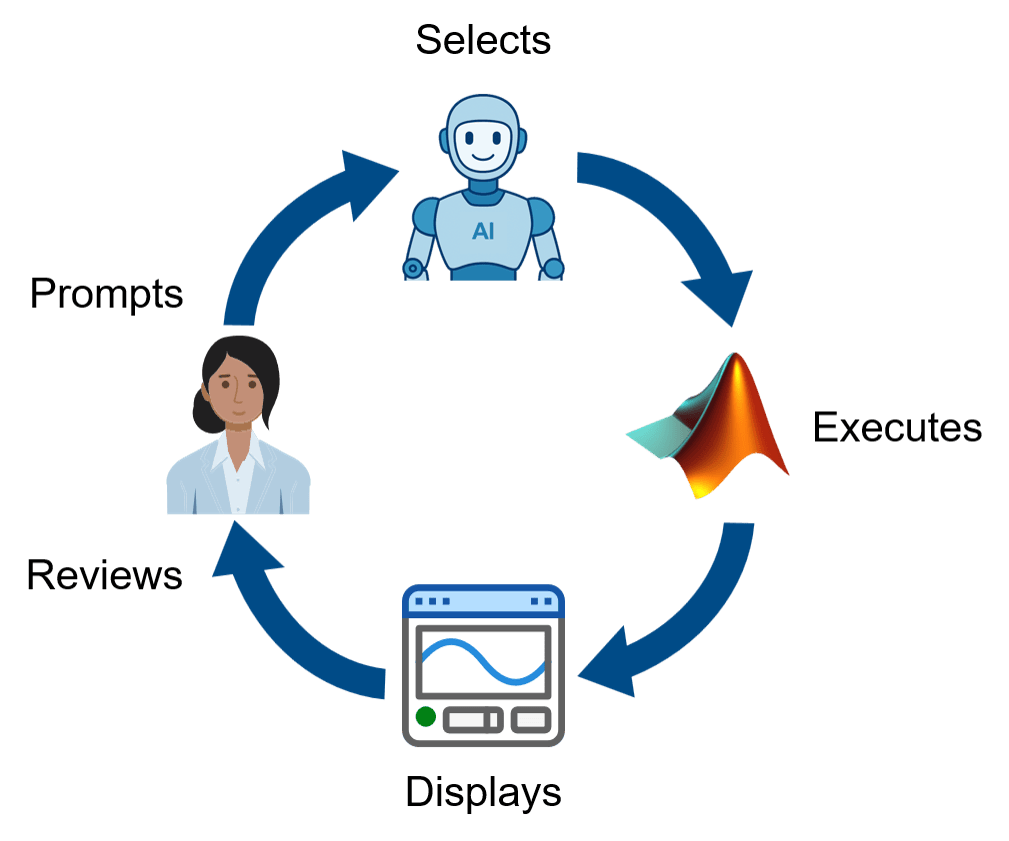 Figure 1: The agentic loop: user enters prompt -> agent selects approved function(s) -> functions execute -> app displays results -> user reviews results. Source: MathWorks
The promise here is deliberately bounded. The goal is not to turn the app into an open-ended system. It is to keep the workflow governed while making the next approved step easier to ask for.
How the loop runs, step by step
- The user enters a prompt in ordinary language.
- The agent selects approved function(s) from the tool set the app author exposed.
- Those functions execute on the existing engineering code, models, and data.
- The app displays results.
- The user reviews results, and the next prompt depends on what just appeared. The loop repeats.
Where fixed controls stop paying
Before any AI is introduced, a good approach is usually already in place, and it shows up repeatedly in conversations with customer engineering teams: a grounded workflow in which the engineering logic, models, and analysis functions are already defined and controlled by the workflow owner. A custom app gives those users a guided process with inputs, plots, tables, and reports. Workflow owners keep control of the implementation, while users — who may sit on separate but related teams or spread across the organization — can run the analysis without editing the code or model behind it.
That design works well when the path is known: pick a file, choose the data, press the button, inspect the plot, export the report. Many workflows do not stay that neat, because follow-up questions rarely follow a fixed path. As users inspect a result, they decide what to ask next, compare cases, check anomalies, and try to understand what changed. The more exploratory the work becomes, the harder it is to cover every useful next step with another button, panel, or a large amount of branching UI complexity.
The distinction is worth holding onto: the underlying engineering workflow may already be well defined. What is difficult to define in advance is every question a user might ask about its results. That is exactly where a grounded agentic front end can add value — it gives users a way to navigate the existing workflow without expanding the app into a map of every possible path.
Worked example: a battery lab assistant in MATLAB
Consider a test engineer looking at battery lab data that includes several runs: a baseline case, a high-temperature case, and a degraded case. The engineer may start with a simple prompt, and then the branch opens up.
- Compare it with the baseline?
- Check it for anomalies?
- What stands out?
All of that can be built into a traditional app by giving the user a set of tools to work through the analysis:
- Add more buttons.
- Add a comparison panel.
- Add an anomaly tab.
- Add menus for follow-up questions.
- Add help text so users know where to find everything and what each button does.
Engineering teams have worked with customers to build applications like this, and they can be the right solution. However, at some point the app starts to look less like a guide and more like a confusing map of every possible route. That slows users down, and it also puts more support and maintenance work back on the workflow owners. Buttons are great when the next step is obvious. They are less helpful when the user is staring at a plot and trying to decide what to ask next.
The agentic loop is what changes the interaction. It does not replace the app, the underlying algorithms, or engineering judgment. It changes how the engineer moves through approved steps. Instead of finding the right control, the user asks for what they want, and the app carries out the next approved action. The user then reviews the result and continues from there.
The demo app and its tool boundary
To make the idea concrete, consider a small battery lab assistant built in MATLAB to demonstrate the approach. The app shows a chat panel on the left and analysis results on the right. The agent is allowed to list available runs, display a run, compare two runs, and run anomaly detection. Those are not arbitrary actions. Each one is an approved MATLAB function with defined inputs and outputs that the app author chose to expose. Those are the only actions the agent is capable of taking on behalf of the user.
Suppose the user wants to start by looking at the high-temperature run. They can prompt the app: "show me the high-temp run".
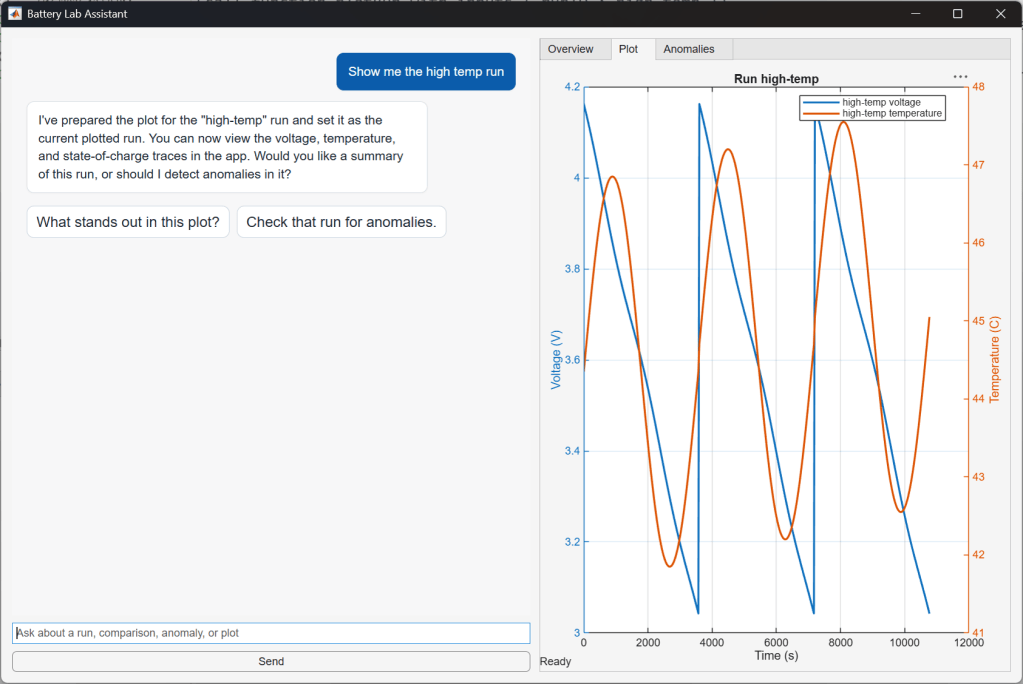 Figure 2: Full view of the app with message "show me the high-temp run" and results. Source: MathWorks
This is the agentic loop in practice. The agent does not invent a way of displaying data. It calls the approved MATLAB function for displaying a run, using the high-temperature run as input. The app renders the outputs for the user’s review. If the results lead toward a comparison with the baseline, the user can continue from there in natural language with "compare with the baseline".
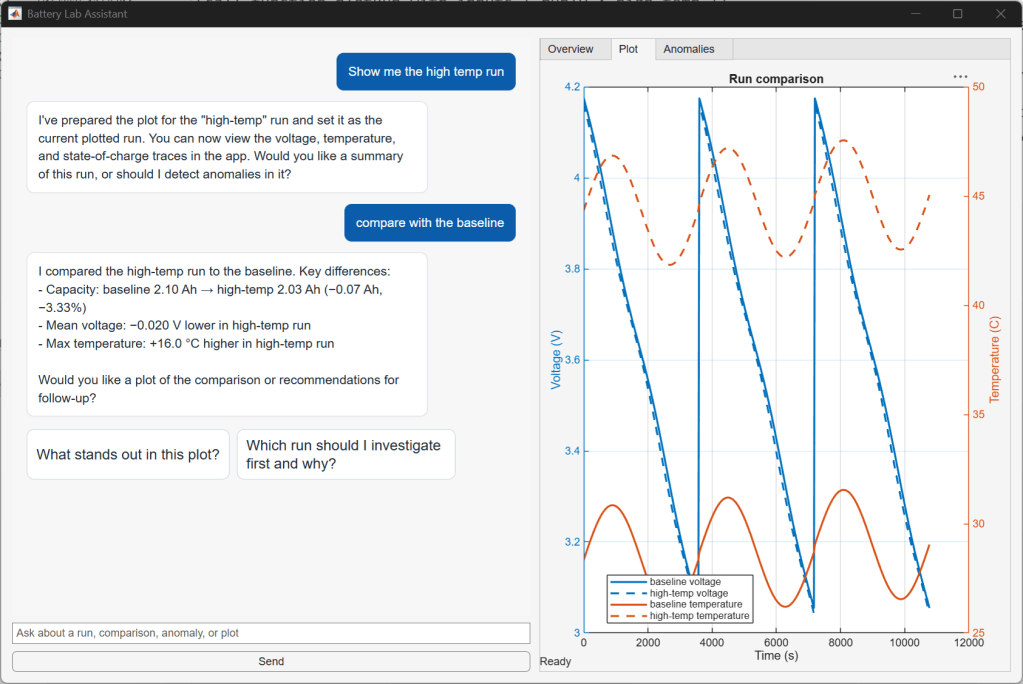 Figure 3: Screenshot of app showing message "show me the high-temp run" and chat response, followed by "compare with the baseline" and the response. Source: MathWorks
Under the hood: wiring the loop to approved functions
That is the user-facing part of the example. Underneath it, the app needs a way to run that agentic loop and connect each prompt to the approved MATLAB functions made available to the agent.
The MATLAB AI Agent SDK is the framework used for this example. It helps build this kind of agentic loop inside MATLAB: connecting to a large language model, keeping message history, registering MATLAB functions as callable tools with defined inputs and outputs, and managing shared agent state. The exact code is less important than the shape of the design. The important step is deciding which MATLAB functions become tools available to the agent and what they return to the app.
In one sense, this is familiar. A traditional app already has approved actions behind its buttons and menus. The difference is that with an agentic front end, the author provides a written description of each tool to the agent, so the agent can pick between them based on the user’s prompt. The user interface changes, but the approved engineering actions remain the boundary.
Four design questions to settle before launch
The same design choice also covers what information the large language model receives: raw data, summarized results, metadata, or only the user’s prompt and tool outputs. Those choices raise the right engineering questions, and engineering teams need to ask them next, because that is where the design work is.
- Which tools should be exposed?
- What data should be sent to the model?
- What should be logged?
- Where should human review stay in the loop?
Two ways to expose the same workflow
| Dimension | Fixed controls (buttons, panels, tabs) | Bounded agentic front end |
|---|---|---|
| How the next step is found | The user locates the right control | The user asks in ordinary language |
| How the app grows | More buttons, comparison panels, anomaly tabs, menus, help text | The exposed tool set stays as defined; the path is not pre-mapped in UI |
| Who carries the upkeep | Support and maintenance work returns to workflow owners | Owners still control functions, data, and outputs, without a branch for every follow-up |
| What the user must learn first | Where everything is and what each button does | Less, before useful work gets done |
| Best fit | Linear, stable path; three actions with known usage | Actions are known, but the useful path through them is not predictable |
Common misconceptions about agentic front ends
- “The agent will improvise new analysis.” It cannot create a new analysis routine or change the underlying engineering; it only selects among registered functions.
- “The chat layer replaces the app.” It does not replace the app, the underlying algorithms, or engineering judgment.
- “Every app benefits.” When the workflow is linear and stable, ordinary controls are clearer, and a chat panel probably adds more work than value.
- “Open-ended behaviour is the point.” The practical promise is to keep the workflow governed while making the next approved step easier to ask for.
- “The work is in the code.” The exact code is less important than the shape of the design — which functions become tools and what they return.
Choosing the right slice: the “three actions” test
An agentic front end should not be added to every app. If the app has three actions and the design team knows when to use them, keep the ordinary controls. The place to look is different: the app author knows the set of actions but cannot predict every useful path through them, and the next step depends on what result the user just saw.
Battery test review is one example. Parameter studies, lab data checks, signal-processing reports, simulation result triage, and many other applications have similar shapes.
Action recommendations for application owners
- Replace the wrong framing at the outset: the useful question is not "where can we add chat?" It is "which approved actions should users be able to do through chat?" Designing around approved steps changes the experience on both sides.
- Inventory what the app already gates behind buttons and menus, since those are your candidate tools.
- Expose each approved function with defined inputs and outputs, and write a description for the agent so it can pick between tools.
- Decide, in writing, what the model receives: raw data, summarized results, metadata, or only the prompt and tool outputs.
- Define logging and place human review explicitly in the loop before users rely on the results for decisions.
- Re-apply the linear-and-stable test to any workflow you add it to; skip the chat layer where the next step is obvious.
The value sits in the boundary, not the chat bubble
Engineering apps already sit on top of grounded engineering workflows, and those workflows sometimes outgrow fixed controls. For the engineer who builds the app, there is less pressure to predict every possible next click: the author still controls the MATLAB functions, data, and outputs, but does not have to turn every follow-up path into another button, another panel, and more app complexity. For the app user, there is less to learn before getting useful work done — they can ask for the high-temperature run, ask for a comparison, ask what changed, and stay focused on the engineering question instead of the mechanics of the UI.
For readers tracking how AI is actually used inside business tools, the reusable lesson is a scoping rule: adopt the interface where the actions are known but the routes are not, and keep the tool set, the data handed to the model, the logs, and the review point as explicit design decisions. Value shows up when the interface stays bounded but the path through it can change — expert workflows then reach more users without every possible path becoming more UI to build, teach, and maintain.