
The Intelligent Assistant Lands Inside Pages, Keynote and Numbers: A Workflow Guide for Office Teams
The clearest signal in Apple's latest round of office-software updates is not that a chatbot got smarter, but that the assistant moved into the file itself. Pages for text documents, Keynote for presentations and Numbers for spreadsheets have all gained the Intelligent Assistant, a capability supported by Apple and OpenAI artificial intelligence models. Instead of only answering questions, it reads the document or spreadsheet you are currently editing and then drafts text, rewrites passages, assembles slides, produces formulas and organises data.
For anyone whose working day is spent inside documents, that change of position matters more than any model specification. The task shifts from "ask, read, copy, paste, reformat" to "describe the goal and let the software operate on the file". Below is a breakdown of where the assistant fits into each application's workflow, how the newly opened Model Context Protocol (MCP) changes third-party access, what you can actually use today, and which results still need a human check.
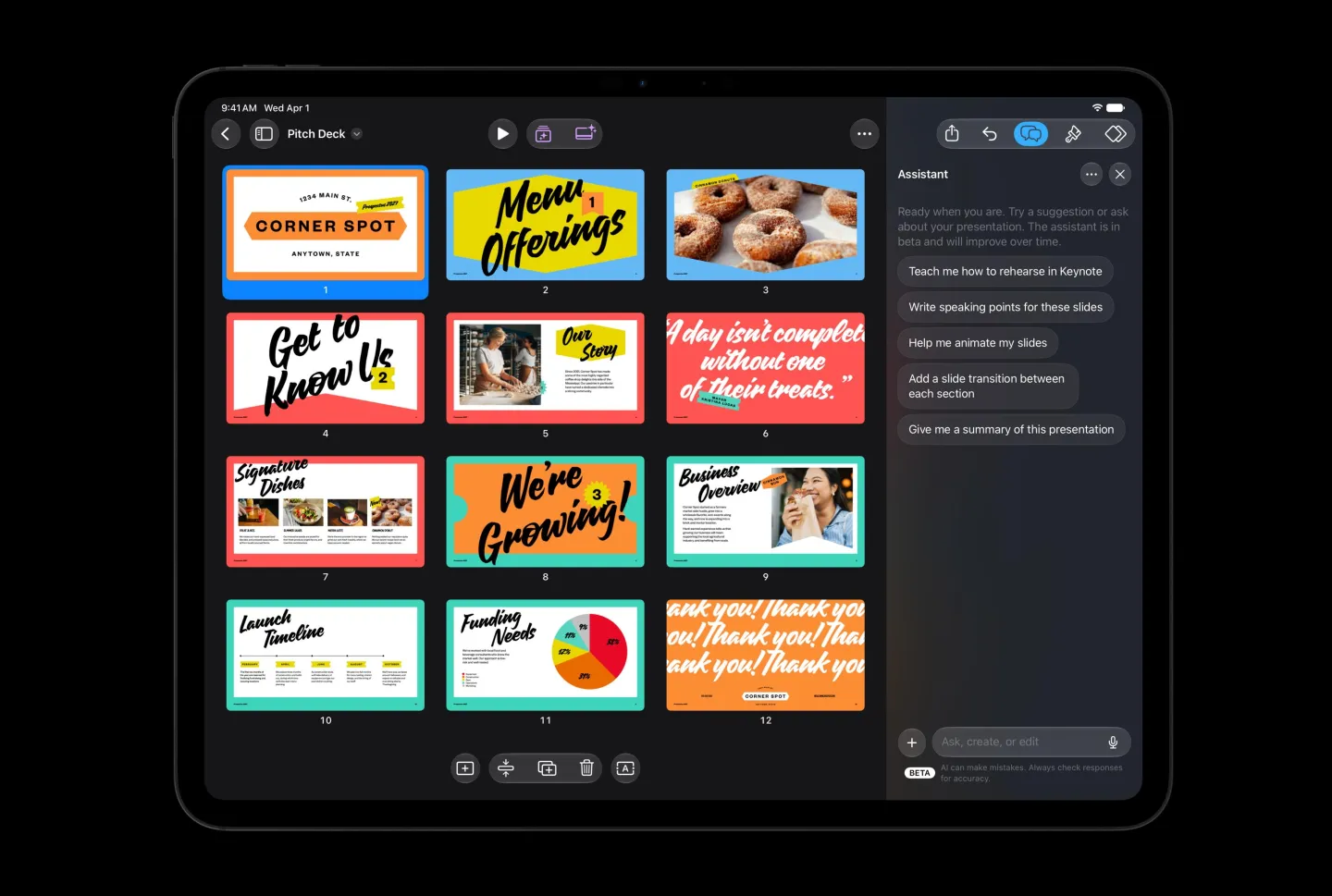
One assistant, three different units of work
The same underlying capability is presented differently in each app, because the object being worked on differs: a document, a deck, a sheet. The table below maps the described tasks onto the point in the workflow where they appear.
| Application | Tasks the assistant takes on | Where it enters the workflow | What still needs your review |
|---|---|---|---|
| Pages | Draft articles, restructure paragraphs, adjust tone, edit and polish existing content, write a specific section, generate images or graphic elements, look up the latest information on a topic and integrate it | Inside the open document; it can also explain how to use specific Pages tools and offer improvement suggestions based on the current file | Inserted facts, tone changes and any restructured paragraph order |
| Keynote | Build presentation content around a topic, generate slides, write speaker notes, add animations, refine existing pages, create images and graphic elements | Information organising, page layout, visual design and narrative structure are merged into one pass driven by a written description of the goal | Narrative sequence and visual hierarchy, especially in business reports, teaching materials and project reviews |
| Numbers | Find patterns in the data, generate complex formulas, create custom tables, recommend charts suited to the data | Natural language describes the calculation need, so you do not have to rely on familiarity with spreadsheet functions | Every generated formula and analysis result, particularly in financial calculations and business decisions |
In Numbers, for example, a user can ask the app to analyse the trend within a set of data, build a summary table, or produce a formula that carries out a specific calculation. For people who handle large volumes of data without professional analysis training, this lowers the entry barrier. The caution that comes with it is just as concrete: AI-generated formulas and analytical results still need to be checked.
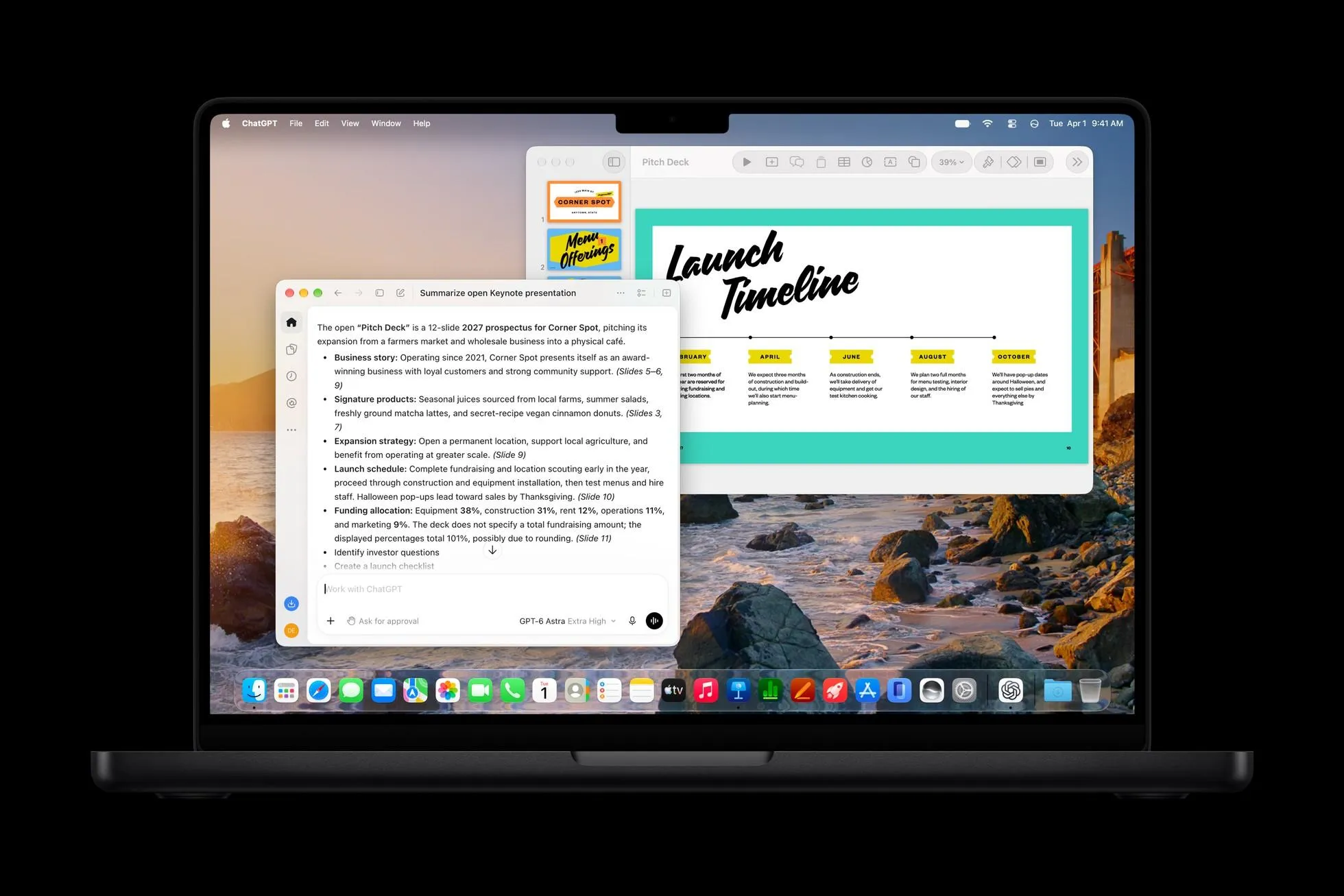
The difference between this and a standalone chat window is mainly one of handoff cost. Working inside the document environment is expected to reduce copy-paste and repeated switching between apps, which is where much of the day's friction actually sits for non-technical users.
Step-by-step: putting the assistant into a real document task
- Pick one repetitive task per application to start with, such as a first draft of a report section in Pages or a summary table in Numbers. These are tasks the assistant is described as handling directly.
- Work inside the file rather than in a separate chat window, so the assistant can draw on the existing document context.
- Ask for a deliverable, not a topic: "draft section three in a neutral tone", "add speaker notes to these slides", "create a formula that totals this column".
- Use it as a manual when you meet an unfamiliar feature. In Pages it can explain the use of a specific tool and give suggestions based on the current document.
- Insert a verification step before the file leaves your hands: re-read factual insertions, test formulas against the data, and review slide order and visuals.
- If your team plans to connect outside agents, treat MCP access as an authorisation decision first, since the protocol lets AI reach tools and data sources according to the permissions granted.
Model Context Protocol: a doorway for third-party agents
The second half of this update is about openness. Pages, Keynote and Numbers support the Model Context Protocol (MCP) on macOS 27 and later versions, which allows qualified third-party AI agents to interact with these applications.
MCP is an open protocol used to connect AI models with external tools, data sources and applications. Its practical effect is that AI is no longer limited to producing text: with the relevant authorisation it can call tools and carry out more specific workflows. For office software, that means users may one day operate documents, presentations and spreadsheets through different AI assistants rather than depending entirely on Apple's built-in Intelligent Assistant.
Availability checklist: what works right now
- The Intelligent Assistant is currently released in beta form.
- It requires a device that supports Apple Intelligence.
- It needs iOS 27, iPadOS 27 or macOS 27 and later versions.
- MCP support for third-party agents in these three apps is listed for macOS 27 and later.
- Feature availability is still constrained by language and subscription conditions, so at this stage not every user can access the full functionality.
Creative applications follow the same pattern
Outside the office suite, Apple is also pushing AI into creative tools, and the interaction design is recognisably the same: describe what you want, let the software perform the operation. Pixelmator Pro has added a "Generate Fill" (generative fill) capability, where users change a specific area of an image through a text description. The system attempts to match the lighting, perspective relationships and texture of the surrounding environment so the modified content blends into the original picture more naturally.
That feature could simplify work that previously required complex selections, layers and retouching tools: you describe what to add, remove or change, and the AI produces the result. The quality of that result still depends on the image content, the prompt, and how well the model understands the scene.
Logic Pro for Mac and iPad will also get an interface adjustment using the Liquid Glass visual style, plus an AI assistant. Apple says users can create the base settings for a vocal recording track from a single prompt, and can also let the assistant help modify an existing music project. The Mac version of Logic Pro will additionally redesign the browser and use on-device artificial intelligence to automatically analyse, classify and tag imported sound material.
- Asset sorting: automatic identification of sound types and tagging helps users locate suitable effects and recording clips faster.
- Track setup: AI-assisted base settings may reduce the operational complexity of part of the production process.
- Templates and stock: Final Cut Pro is planned to integrate templates, graphics, titles and transition effects provided by MotionVFX directly into the app, and to build in a Content Hub offering a material library that includes stock video, photos and backgrounds.
Apple states these creative application updates will be delivered free of charge to existing Creator Studio subscribers in November.
Common misconceptions
- "This is just another chatbot." The described difference is execution: the assistant works on the document or spreadsheet you are editing, not only on your question.
- "A generated formula is finished work." AI-generated formulas and analytical results still require verification, and accuracy demands are highest in finance and business decision contexts.
- "MCP means any assistant can plug in straight away." The support described applies to qualified third-party AI agents on macOS 27 and later.
- "Everyone has the full feature set today." It is a beta, limited by supported devices, operating system versions, language and subscription conditions.
- "Generate Fill makes any edit invisible." The outcome depends on the image content, the prompt and the model's understanding of the scene.
- "The assistant now owns the whole deck." Presentation work still involves information selection, layout, visual design and narrative structure; the assistant merges those steps into one workflow, but you still supply the goal in words.
Action recommendations for teams adopting it
- Start with one high-frequency document type per team, such as weekly project reports in Keynote or data summaries in Numbers, so the effect can be judged on a narrow, comparable task.
- Keep a named human checkpoint for any Numbers output used in financial calculations or business decisions.
- Use the in-document guidance in Pages as a lightweight training channel for users unfamiliar with advanced features.
- Decide your stance on MCP before third-party agents appear in your workflow: which tools and data sources an agent may reach is an authorisation question, not a feature question.
- If your organisation pays for Creator Studio, review the November updates for existing subscribers and test Generate Fill, the Logic Pro assistant and the Final Cut Pro Content Hub against one real project.
- Measure the change in practical terms: drafting time, slide-building time, formula-writing effort and the time spent searching for tagged audio material.
From chat interface to embedded productivity tool
Read together, these updates point to a single design decision: artificial intelligence is being moved out of a standalone chat interface and into the place where work is already happening. Whether the job is revising an article, assembling a presentation, analysing a sheet or sorting recorded material, the AI now participates in the task itself rather than only offering text suggestions.
Whether that translates into real efficiency still depends on the accuracy of generated content, how much control users keep over the result, and how well the applications cooperate with one another. In complex documents, financial data and professional creative tasks, the technology can still produce errors or results that miss expectations, so review remains part of the workflow. This move also comes as Microsoft and Google continue integrating AI into their own office products. As natural-language operation and third-party AI agents enter productivity software, the competitive question may shift from which editor offers the best tools to which product understands the user's intent and helps complete the task end to end.