
AIApplications Review: How Arrowspace S1 Uses AI to Guide Screw Selection and Torque in Repair Workflows
In many small-device repair tasks, the slowest part is often not turning a screw, but first deciding which bit, torque and direction are appropriate. That is where the Arrowspace S1 places AI into the workflow. Rather than relying only on a user’s memory or visual comparison, the device combines a tail probe, a high-definition camera and a companion app to identify a screw head’s specification. When paired with the Smart Case, the recognition result becomes a physical instruction: the matching bit position lights up, and the recommended torque can be set for the task. From an application-focused standpoint, the product is not merely a novelty tool; it is a way to reduce manual guesswork in repetitive precision work.
Where AI enters the screwdriver workflow
The operating logic is simple. The user presses the device’s tail probe against the screw surface. The camera then captures the screw head at its optimal focusing distance. After that, the Arrowspace S1 calls an AI model trained by Arrowmax to analyze the image and determine the screw specification. The result is transferred through a local connection to the phone app, where the user can see the live view, recommended bit, torque setting and gear information. The process can be completed without internet access.
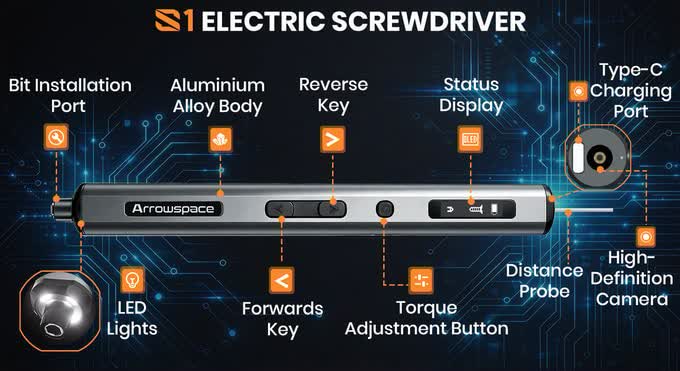
This is a useful form of AI because it is embedded at the decision point, not added as a generic interface. In repair and assembly, choosing the wrong bit can waste time, damage the screw head or make the fastening result inconsistent. By placing recognition before the user applies force, the Arrowspace S1 turns AI from a background feature into a practical workflow step.
Smart Case: turning recognition into a physical action
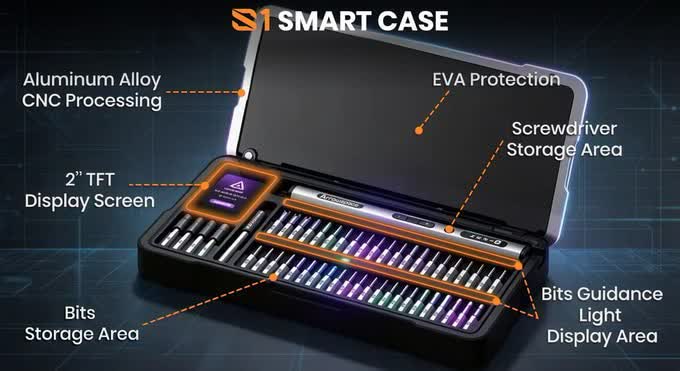
The Smart Case strengthens the application value. The case is designed for the Arrowspace S1 workflow and contains 52 bits. Each bit position has an LED indicator. Once the AI determines the required specification, the corresponding position lights up, allowing the user to take the matching bit without searching through many similar-looking parts.
For a repair user, this matters because visual similarity can be misleading. Small bits can differ only slightly, yet selecting the near-correct one can cause slipping or scratching. The lighting prompt reduces that friction. It also makes the workflow easier to follow in shared environments, where one person may not know every bit layout by heart.
Torque recommendation: reducing damage in micro-screw tasks
Beyond bit selection, the Arrowspace S1 can set a recommended torque based on the identified screw specification. The official torque range is 1 to 10 kgf/cm. This range is relevant for light-duty precision work, where a little extra force can be enough to strip a screw head, damage a thread or overtighten a small assembly.
In devices such as computers, phones and glasses, micro screws are often the most sensitive part of the repair. A wrong torque setting may not fail visibly at once, but it can create repeated problems later. This is why automatic torque guidance is more than convenience: it adds a quality-control layer to the operation. For users handling similar tasks repeatedly, the preset helps make each step more consistent.
Step tutorial: using the Arrowspace S1 in a repair task
The basic application path can be understood in six steps:
- Check the tool status: make sure the Arrowspace S1 is charged and ready to use.
- Open the companion app: connect the device and prepare the interface that will display the recognition result.
- Align the tail probe: place the probe against the screw so the camera can capture the head at the correct distance.
- Review the AI suggestion: confirm the recommended bit, torque setting and gear shown by the app.
- Take the lit bit: if the Smart Case is being used, remove the bit from the position indicated by the LED.
- Drive the screw: proceed at the recommended torque while watching the OLED display for battery, torque and rotation direction information.
This sequence assumes normal use of the product as described by Arrowmax. The step that matters most in practice is the confirmation before action: the AI suggestion reduces errors, but it does not remove the need for the user to verify that the physical part matches the displayed recommendation.
Hardware details that affect daily use
The Arrowspace S1 includes an OLED display for information such as battery level, torque setting and rotation direction. The device has a 600mAh lithium polymer battery. According to the official statement, it can work for about 90 minutes, or complete about 900 screws during disassembly and reassembly. It charges through USB-C, and a full charge takes about 70 minutes.
These specifications point to an application profile rather than a maximum-power tool. The battery runtime is more aligned with batch repair tasks, hobby assembly and short service sessions than with continuous heavy industrial use. For readers evaluating the product, the practical question is not simply “How strong is it?” but “Does it keep working long enough to complete the tasks I usually face?”
Training data and offline operation
Arrowmax states that the AI model was trained on tens of thousands of real screw photographs. The company also says the training samples were collected by its own engineering team, without using external datasets. The stated purpose is to keep accuracy under the company’s own control and to avoid relying on outside data sources.
For end users, the more immediate consequence is the offline-friendly workflow. Because the recognition result is synchronized locally to the app and the process does not require internet connectivity, the tool can be used in repair spaces where connectivity is limited or where an online service is unnecessary. In that sense, the AI function is kept close to the workbench instead of being dependent on a remote service.
Who may benefit most
- DIY users: people who open or assemble small devices occasionally and find bit matching confusing.
- Repair technicians: users who encounter many similar micro screws and need faster tool selection.
- Hobbyists: makers who want a guided workflow rather than manual trial and error.
- Small workshop teams: where different operators may use shared tools and benefit from clearer prompts.
The core benefit is concentrated on screw specification recognition and tool guidance. It is most relevant when the task is repetitive and precision-oriented. If a user rarely handles micro screws, the value may be limited. If the user repeatedly works with small fasteners, the workflow reduction may become the main reason to consider the tool.
Common mistakes to avoid
- Blindly following the AI result: the recommendation should still be checked against the actual screw head before force is applied.
- Poor probe contact: the recognition depends on the camera obtaining the screw head features at the right distance.
- Overestimating scale: the product is oriented to precision and small-screw tasks, not every kind of fastening work.
- Ignoring the OLED feedback: battery, torque and rotation information should be observed during use to avoid interrupted or incorrect operation.
These cautions are not criticisms of the product concept; they reflect the nature of applied AI in physical tools. The system can improve guidance, but the operator still needs to maintain final responsibility for the action.
Crowdfunding status and practical availability
Arrowmax has launched the product on the Kickstarter platform. The electric screwdriver standalone version has an early-bird price of about $80. The bundle that includes the Smart Case and 52 bits has an early-bird price of about $129. The crowdfunding activity went online on October 20 and reached its funding target within 24 hours. The amount raised is now more than ten times the original target.
Compared with a traditional precision screwdriver kit, the differentiator is not the raw driving capability, but the guided path from screw identification to bit retrieval and torque setting. A conventional kit may be lower cost, yet it depends entirely on manual matching. For readers deciding whether to evaluate the Arrowspace S1, the relevant question is whether the time saved and the reduced error risk are worth the price difference in their own repair workflow.
Accessories: extending the tool beyond the basic screw
Official extension accessories include an angle adapter, a bit conversion kit and a mini vise. These items do not change the AI recognition core, but they address a practical issue: many screw tasks are difficult because the workpiece is awkward to reach or cannot be held steadily.
An angle adapter can help in tight positions, while a vise can stabilize small parts before disassembly. For repair workflows, such accessories often matter as much as the main tool itself. A screwdriver is only useful if the user can access the screw with stable control.
Action suggestions
- If you often repair electronics: prioritize the Smart Case version, because the 52-bit LED guidance is where the workflow advantage becomes most visible.
- If you only need occasional fixes: evaluate whether the price difference is justified by the reduction in manual matching.
- If you manage a shared repair station: consider whether clearer prompts reduce training time and mis-selection errors.
- Before committing: review the crowdfunding status, pricing and accessory availability carefully, since the product is still tied to the campaign stage described by Arrowmax.
Conclusion: AI value comes from the small chain of actions
The interesting point of the Arrowspace S1 is not that it adds AI to a screwdriver for its own sake. The value lies in the chain: recognize the screw head, sync the result to the app, indicate the correct bit in the Smart Case, suggest torque and then guide the physical action. This chain turns a narrow recognition task into a usable operating process.
For readers focused on AI application rather than model details, the lesson is clearer: useful AI in tools does not need to be broad or conversational. It can be highly specific. If the recognition accuracy is strong enough, a simple prompt — “use this bit, set this torque” — can become the difference between trial and error and repeatable repair work. That is the practical significance of the Arrowspace S1 within an AIApplications view.