
AI Applications Guide: How Chrome's Gmail-Suggestion Autofill Changes Form Workflows
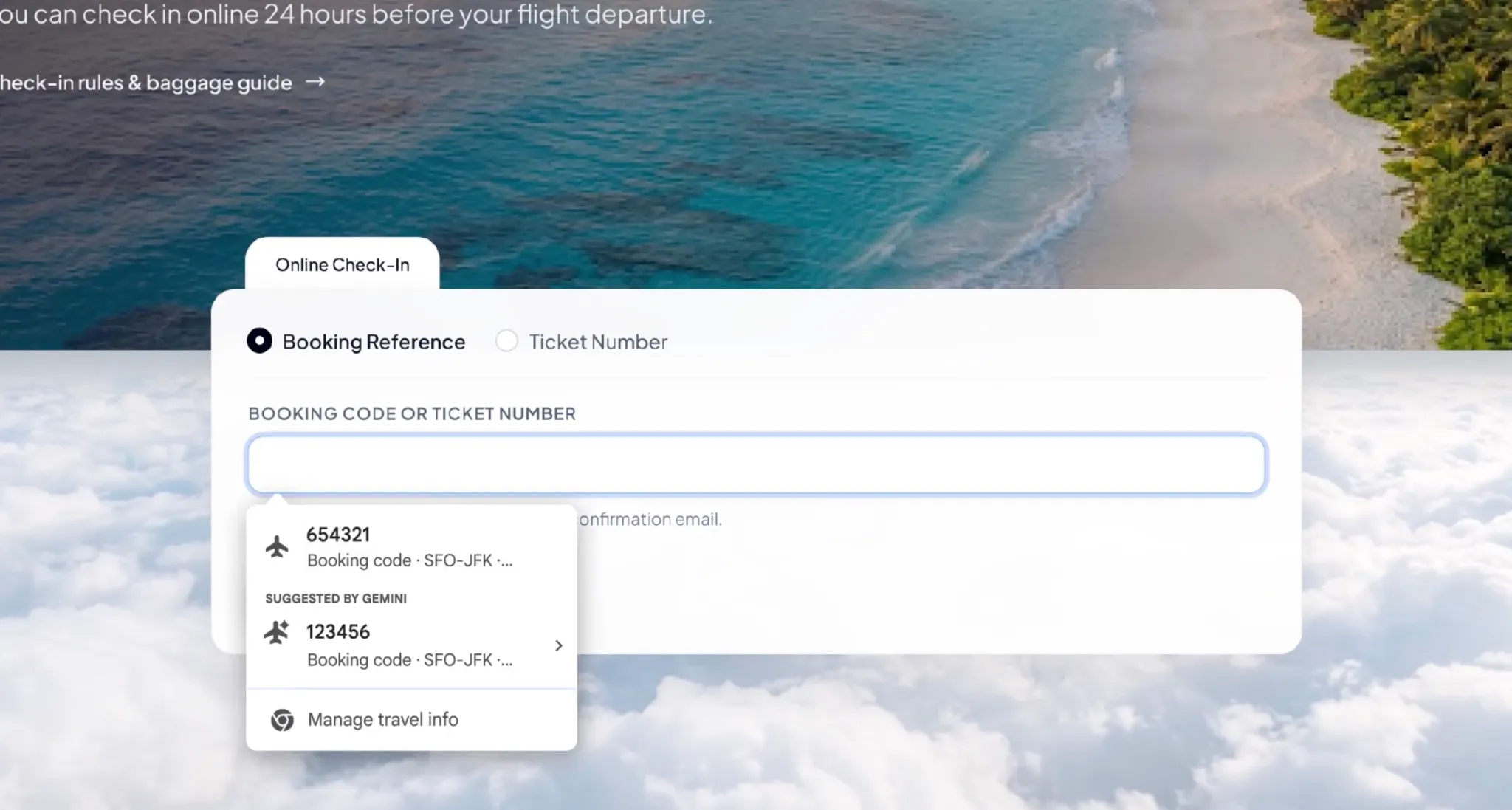
Filling an online form no longer has to begin with a manual search through email. Google has added a Gmail-powered suggestion layer to the Chrome browser, using Gemini and Personal Intelligence to look for order numbers, tracking numbers, and booking details inside a user's Gmail inbox when a webpage form appears to need that information. For everyday web work, the change is concrete: the browser is no longer limited to stored form data; it can also retrieve relevant content from an authorized connected service and offer it as a reviewable suggestion.
From static autofill to context-aware form assistance
Chrome’s traditional autofill capability mostly handles information that has already been saved: names, addresses, phone numbers, and payment card details. The new Gmail integration expands that scope. It can search for order identifiers, parcel tracking numbers, and airline or reservation confirmation data, then surface those values inside an autofill menu when the current page asks for a matching field.
This moves autofill from "remembering information the user has already saved" toward "finding the information needed for the current task from connected services." The feature is not a separate chatbot answering a question; it sits inside the browser form process, where Gemini can match context from a live webpage with context from the user's email.
Where the application fits into common browser tasks
The most direct value appears when a user is already moving between email and a website. A logistics portal asking for a tracking number may receive a suggestion drawn from a shipping confirmation or order update in Gmail. A flight check-in page may use booking details extracted from an airline confirmation email. In both cases, the user avoids opening Gmail, searching for the correct message, and copying a number into another page.
| Workflow | Manual process before | Chrome + Gmail + Gemini behavior | Review still needed |
|---|---|---|---|
| Parcel tracking | Open Gmail, find shipping email, copy tracking number | Chrome can suggest a tracking number when a webpage asks for it | Confirm the number matches the current shipment |
| Airline or reservation check-in | Search confirmation emails for booking codes | Chrome can propose booking-related information from Gmail | Check that the suggestion belongs to the current trip |
| Order-status forms | Copy order identifiers from receipts | Chrome can surface order numbers from Gmail | Verify the order number against the order being handled |
How the suggestion appears in the Chrome workflow
If Chrome identifies a field that may need email-based information, a Gemini-provided suggestion can appear in the autofill menu. The user is not required to accept it automatically. Each suggestion can be reviewed, and the source is shown so the user can judge whether it relates to the task at hand.
- Check that Chrome and the user account are included in the phased rollout.
- Enable Personal Intelligence if it is required for the enhanced autofill experience.
- Open the webpage form where an order number, tracking number, or booking detail is requested.
- Look for a Gemini suggestion in the autofill menu instead of switching away to search Gmail manually.
- Review the suggestion and its displayed source before choosing whether to use it.
- Use Chrome settings to manage, delete unwanted suggestions, or disable the enhanced autofill feature.
Who can access the feature first
Google says the capability has started rolling out to users in the United States. The described availability includes desktop Chrome, as well as iOS and Android users who use Chrome’s Gemini feature. Personal Intelligence must be enabled for the Gmail-based extraction experience. Availability is not universal at launch; it can depend on account eligibility, relevant settings, and phased rollout progress.
Privacy controls and the real data boundary
Because Gmail inboxes often contain shopping records, travel plans, bills, order confirmations, and other sensitive communications, the feature’s usefulness comes with a data-access question. Google states that sensitive autofill information is encrypted. Users can control whether the feature is enabled and what information it can access. They can also delete suggestions they do not want or turn off enhanced autofill entirely.
The remaining uncertainty is behavioral: how Chrome chooses an email, how it decides that a piece of information is relevant to a form, and what appears in the suggestion menu. Google says users can manage the feature and its data-access permissions through Chrome settings, but practical understanding may still require hands-on use and careful reading of the settings.
Common mistakes to avoid with Gmail-based autofill
- Assuming every Chrome user receives the feature immediately, even though account eligibility and rollout phase matter.
- Treating a Gmail suggestion as automatically correct without checking the displayed source.
- Enabling broad access without deciding whether a personal mailbox should be searched for routine browser tasks.
- Forgetting to delete a wrong or obsolete suggestion that could appear again in a similar form.
- Confusing today’s Gmail-based autofill with the Google Photos extension planned for later stages, which has not been broadly launched in this update.
What users should watch for in daily use
Several practical factors will determine whether this application feels helpful or intrusive. The first is field recognition: can Chrome consistently understand different website forms? The second is data freshness: can it avoid selecting an expired order, a duplicate booking, or a confirmation that resembles the current task? The third is control: can users easily see which email information is being used and restrict access when needed?
Recent expansion of Chrome autofill capabilities
In recent years, Chrome’s autofill scope has grown. In 2025, Google expanded smarter form understanding so the browser could handle more complex items such as passport numbers, driver’s license details, and vehicle identification numbers. In 2026, some advanced autofill capabilities moved to mobile devices, and Chrome’s integration with Google Wallet was strengthened. The Gmail step continues this direction by using connected services to supply form-relevant context.
Action recommendations for users applying this feature
- Identify high-friction tasks first: parcel tracking, check-in, order-status lookup, and other flows that already require switching between email and websites.
- Use the available controls instead of assuming default access is acceptable.
- Use the source label as a verification step before inserting any email-derived number or code.
- If an incorrect suggestion appears, delete it and review the settings so future matches are less likely to be wrong.
- Turn off enhanced autofill if the privacy tradeoff is not acceptable for a particular account, device, or workflow.
The application takeaway
Chrome’s Gmail-enhanced autofill is best understood as an applied AI feature rather than a general browser convenience. It does not simply add more fillable fields; it makes browser tasks, email context, and cloud-service permissions work together inside the form-filling step. The useful outcome is fewer repetitive lookups, while the open question is whether accuracy, user control, and data-scope clarity can match the speed the feature promises.