
AIdataNewsGlobal AIApplications: How Document Crunch Embeds CrunchAI Into Trimble Construction Review Workflows
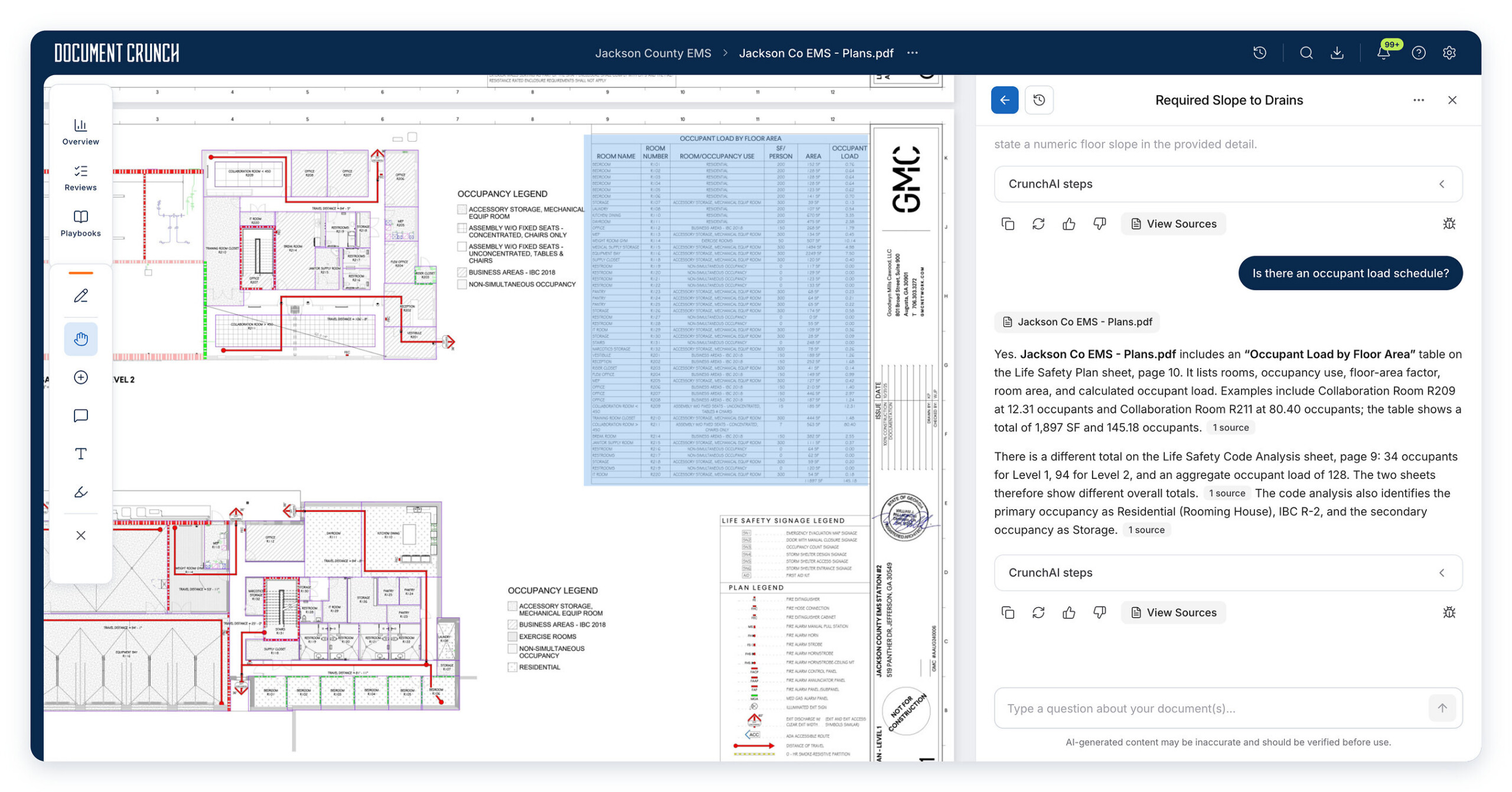
Rather than treating artificial intelligence as a distant platform topic, this AIApplications piece from AIdataNewsGlobal asks a narrower question: what does AI look like when it is used to check a real project package before construction? Document Crunch, a company associated with Trimble, has introduced project-level risk intelligence capabilities powered by CrunchAI. The application is concrete: it places a search and query layer over drawings, contracts, specifications, and other project papers so teams can examine scope gaps, contradictory requirements, and potential problems before work starts.
Why General Tools Fall Short
Construction packages are not ordinary text files. A drawing set can contain large, text-heavy sheets, and relevant language may appear as notes, allowances, or scope wording across many pages. A general-purpose AI answer may therefore miss how a drawing note relates to a contract clause or a specification section. The gap is not simply reading speed; it is cross-document consistency. CrunchAI is positioned for that gap by indexing drawing text and allowing questions to be asked across the document collection.
Where CrunchAI Enters the Workflow
In the Document Crunch workflow, the value is not only that documents can be read. The review process becomes queryable. A user can compare drawings with contracts and specifications, investigate possible missing scope, and confirm findings through citations linked to source documents. The shared project environment supports security and collaboration, so teams can discuss issues, track review activity, and follow whether risks have been handled. Findings can move into standardized reviews, with follow-up and resolution tasks assigned.
To improve response quality for construction use, CrunchAI applies pre- and post-processing steps with agentic optimization. For a business audience, the practical result is more important than the method: the tool is meant to keep answers tied to the project record while supporting workflow review.
Application View: Document Sets as One Reviewable Environment
| Review target | What teams can ask | Why it matters |
|---|---|---|
| Bid sets | Are sheet indexes complete, are specification sections missing, and are discipline-level discrepancies visible? | It supports preconstruction checks before award. |
| Drawings plus contracts | Do drawing requirements conflict with contract terms or scope language? | It surfaces contradictory requirements and unclear responsibilities. |
| Project package | Where are missing scope items or potential risks across multiple documents? | It helps teams address issues before construction. |
| Review output | How can findings become standardized company checks, follow-up tasks, and tracked resolutions? | It connects discovery to workflow management. |
Practical Checklist: What a Complete AI-Assisted Review Should Cover
- Document completeness: verify that drawing sheets, specification sections, and related project documents are present.
- Scope clarity: identify requirements that may be missing, overlapping, or unclear across drawings, contracts, and specifications.
- Source verification: open citations linked to source documents before treating a result as actionable.
- Ownership: assign a person or team to each identified issue.
- Standardization: map findings to company review checks so similar projects use consistent criteria.
- Resolution tracking: monitor whether issues have follow-up and whether risk is being addressed.
Step-by-Step Workflow: Using Document Crunch and CrunchAI in a Construction Review
- Gather the project set. Bring together construction drawings, contracts, specifications, and other relevant project documents in the existing Document Crunch environment.
- Start a cross-document review. Use the chat interface to ask questions that compare sheets, contract clauses, and specification text instead of reviewing each document in isolation.
- Look for mismatch patterns. Query for missing scope, contradictory requirements, unclear responsibilities, missing sheets, missing specification sections, and discipline-level discrepancies.
- Validate each finding. Follow the citation link to the source document before recording the issue.
- Place the finding into a standard check. Move the result into a company review checklist so the same risk can be handled consistently.
- Assign follow-up. Use the shared project environment to discuss the issue, track the review activity, and monitor resolution.
- Complete the preconstruction review. Resolve or document requirements before contract award when possible, reducing the number of unresolved issues carried into execution.
Common Misconceptions
Even helpful AI tools can be misunderstood inside production workflows.
- “A single model answer is enough.” The application works best when answers are checked through source-linked citations and project judgment.
- “Only drawing text matters.” Scope language, notes, allowances, and related clauses can appear across sheets and other project documents.
- “Review is finished after discovery.” The capability also needs to move findings into standardized checks, task assignment, and monitoring.
- “Preconstruction risk can wait.” The source position is that teams should address requirements and scope questions before contract award to reduce unresolved issues later.
Action Recommendations
For teams adopting this application pattern, the useful next steps are operational rather than theoretical:
- Use the capability inside existing Document Crunch workflows instead of treating it as a separate one-off question tool.
- Define a standard set of company checks for drawings, contracts, specifications, and related project documents.
- Require citation review before a finding is logged as an issue.
- Track whether identified missing scope or contradictory requirements have follow-up and resolution tasks.
- Keep security and collaboration settings active while teams discuss findings in the shared project environment.
Availability and Application Takeaway
Document Crunch’s construction drawings review capability is available to all users. Within existing Document Crunch workflows, it lets teams review drawings alongside contracts, specifications, and other project documents. For readers of AIdataNewsGlobal, the application lesson is clear: the useful part of AI in this case is not abstract model capability, but the ability to search a complete document package, connect requirements across files, and move findings into a governed review process.