
Firefox Smart Window (Intelligent Window) for Application Teams: How Mozilla Turns a Browser Side Panel into a Form-Filling Assistant
For teams that repeat the same online entries across portals, applications, and registrations, Mozilla is testing a new feature in the Firefox Browser called Smart Window (intelligent window), a side-panel assistant that can understand page content and help fill online forms. Its practical goal is to reduce repetitive typing, map user-supplied information to form fields, and present the planned entries for review. Because this is one of several experimental browser AI directions pursued by multiple vendors, the most useful first question for AIApplications readers is not how the model works internally, but how such an assistant may fit into everyday application workflows.
What the announcement confirms for application readers
The confirmed facts can be summarized as one feature, one assistant interface, and one of the many experimental directions among multiple vendors. Mozilla is testing a new Firefox browser capability called Smart Window, an intelligent window-style side panel that helps with online forms. The Firefox Browser feature is described as more than a chatbot, but it remains in testing rather than a generally available public rollout.
What Firefox Smart Window is designed to do
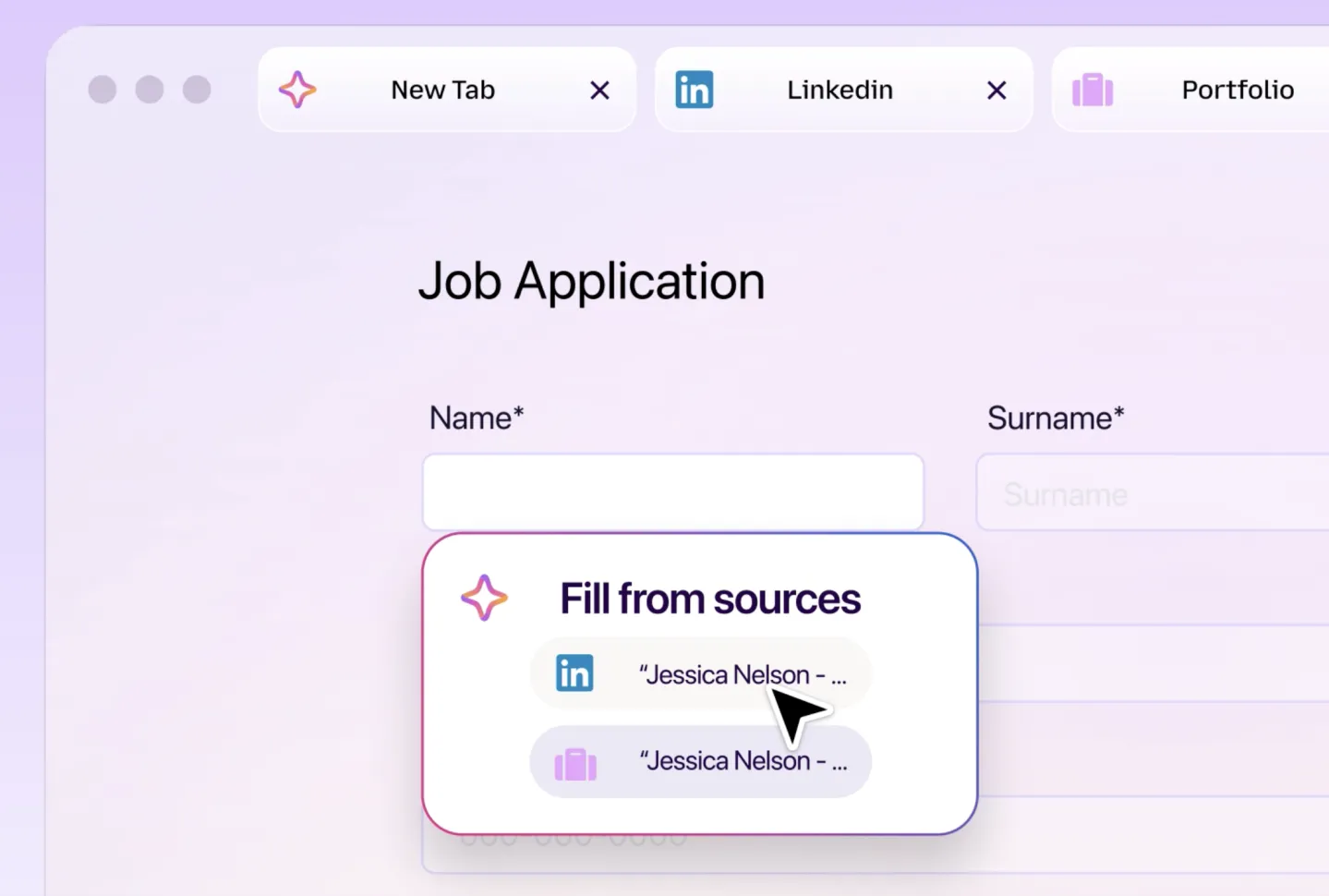
Mozilla describes Smart Window as a Firefox browser feature that goes beyond a normal chatbot. The assistant is shown as a side panel that can analyze the current web page, identify a form, and fill the relevant fields using information the user provides. In the demonstration, a natural-language request can be used for tasks such as completing a job application, booking a service, or moving through an online registration process. The assistant reads the page structure, maps supplied data to form boxes, and presents the intended entries so the user can inspect them before the form is completed.
Core application characteristics
- Runs inside the Firefox browser as a side panel.
- Uses natural language instead of requiring a scripted automation process.
- Reads web-page content and targets form fields rather than only answering questions.
- Can extract details from user-provided materials, such as a resume, for job application forms.
- Shows the intended submission information before completion, allowing review and correction.
- Emphasizes user control over data access as one of its key privacy concerns.
How it differs from a traditional browser AI sidebar
Many browser AI tools are mainly conversational helpers: they summarize, answer questions, or assist with search. Smart Window is presented differently. Its intended role is to interact with the actual web page being visited, understand its fields, and support task execution. For business users, this shifts the value proposition from information retrieval toward routine online administration.
| Comparison layer | Common browser AI sidebar | Firefox Smart Window as described |
|---|---|---|
| Main task | Provide answers, summaries, or search help | Understand the current page and assist with page-level actions |
| Interaction focus | Conversation with the user | Web-page elements, especially form fields |
| Typical output | Text response | Populated form fields that the user can review before submission |
| Workflow value | Faster information access | Less repetitive manual input for routine online forms |
A cautious evaluation path for teams
Because Smart Window is still in testing and no general release time has been announced, teams should treat it as an evaluation signal rather than a production automation method. A practical test plan can be kept simple.
- Choose one repetitive, low-risk web form scenario, such as a sample registration or a non-sensitive job application exercise.
- Use the Firefox browser side panel only for a clearly defined page task, rather than asking it to manage an entire business process.
- Provide the minimum information needed for that task and decide which data the assistant may access.
- Review each field the assistant proposes, especially personal details, work history, contact details, dates, and legally sensitive answers.
- Note where it fails: unrecognized fields, wrong mappings, incomplete pages, or ambiguous instructions.
- Keep a human verification step before any official submission, because form filling still requires accuracy and accountability.
Application scenarios shown in the demonstration
- Job applications, where name, contact details, education, and work experience must often be entered into many fields.
- Service bookings, where the user wants routine page information filled from supplied details.
- Online registrations, where the same identity or profile data is repeated across several forms.
Common misunderstandings to avoid
- It is not only a chatbot. Mozilla’s description places Smart Window closer to an intelligent window assistant that can operate on web-page content, not merely respond in a chat panel.
- It is not confirmed as generally available. The capability remains in testing, and the exact timing for opening it to all Firefox users has not been disclosed.
- Automatic filling does not mean automatic submission. The demonstration emphasizes that the user can check and modify information before the form is completed.
- Privacy control is a design priority, not a replacement for caution. Users are described as being able to control which information the assistant may access and use.
- Early browser AI execution should be treated as a trend among multiple vendors, not as a reason to assume any single product is mature or universally reliable.
Action advice for AI application readers
For product, operations, and administrative teams, the useful takeaway is to prepare a lightweight way to judge browser-based task AI. Start with a list of repetitive web forms that already consume time. Then define a safe test boundary: low-risk tasks, limited data, visible field review, and human final approval. The broader application lesson is that AI inside the browser may move from helping users read pages to helping users complete page-level actions. If Smart Window and similar tools become more mature, their value will depend less on novelty and more on whether they can consistently fill complex forms, respect data boundaries, and keep the human reviewer in control.
Conclusion
Firefox Smart Window shows one concrete direction for browser AI: a side panel that understands web pages, works with natural language, extracts relevant information, and helps populate online forms. Mozilla frames it as an intelligent window assistant with privacy and transparency considerations, while also keeping it under testing. For AIApplications readers, the feature is valuable now as a preview of how routine browser tasks may be automated. The decisive questions for future adoption are simple: Can it read forms accurately, can it use the right information, can it leave the user in control, and can it do so consistently enough to reduce manual web work without creating new risk.