
AI Applications in Practice: Letting Coding Agents Work From Task Files Inside Git
Ask an AI coding agent to change something and you hit the limit of the arrangement very quickly: the agent reads the repository, and it reads almost nothing else. Requirements parked in Jira or Redmine stay invisible to it, decisions written up in chat go missing, and the reasoning behind a change lives only in someone's head. The application pattern that removes this blind spot is easy to state — treat a development task as a Markdown file that lives inside Git, next to the code it describes — and it turns every agent run into versioned, reviewable work. This walkthrough from the AIApplications desk at AI & Data News covers how the files are organized, how the workflow runs, who touches what, and where teams usually go wrong.
Why the repository is the agent's whole working world
Because the code is the source of truth for an AI coding agent, every piece of material the agent needs has to sit inside that repository. Documentation got there first: standalone documentation software has given way to Markdown files stored in Git, and Today those files usually live in a /docs folder inside the code repository. That practice goes by the name Docs as Code or Docs Like Code.
Agents make the arrangement more valuable than it was for human readers alone. An agent can read the documentation to understand a system, change the code, and update the affected documentation within the same workflow. Documentation then stops being a separate activity that must be finished afterward and becomes part of software development.
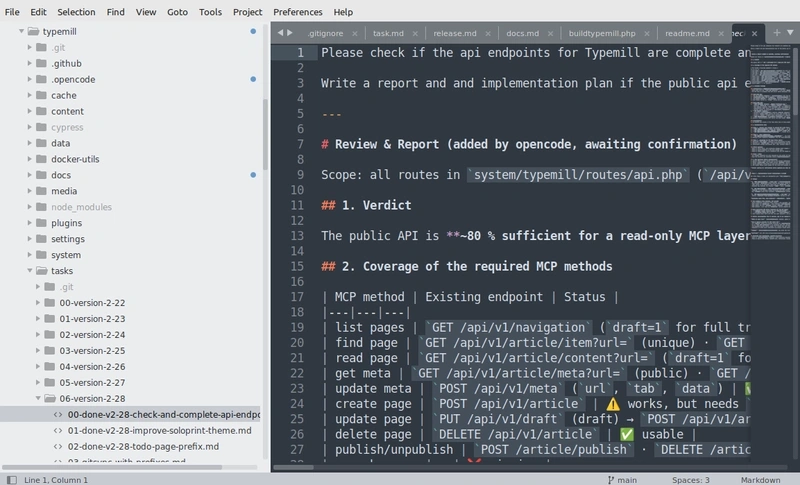
Making the same move with tasks
Development tasks can follow the same principle. Stored as Markdown files, they can be read directly by the agent, used to plan its work, and updated with the outcome; Git keeps that task history right beside the history of the software and the documentation. Spec-Driven Development (SDD) already reflects the idea — in SDD, Markdown specifications define intended behavior before an agent implements it. A task file can serve a similar purpose, and the level of detail depends on the job: a small maintenance task may need only a short description, while a complex feature may require acceptance criteria, technical decisions, dependencies, and testing requirements.
SDD is often supported by dedicated tools such as Spec Kit, but a simpler approach is enough to start: treat the task file itself as the specification. That keeps the transition cheap, because it needs nothing beyond Git and an agent.
The workflow: five steps with one human gate
- Describe the task. Record a brief description of the change or feature to implement.
- Analyze the requirements. The agent reads the task file and inspects the relevant code and documentation.
- Create an implementation plan. The agent adds a proposed solution and names the changes it intends to make.
- Review and approve. A developer checks the plan and authorizes implementation.
- Implement and report. The agent changes the code, updates documentation where necessary, and appends an implementation report to the task file.
Description, plan, and report stay together in one file, which makes it easy to revisit the original requirement, understand the planned approach, and see what the agent actually changed. The approval step is the control point: the agent does not move straight from the task description to implementation, so the plan can be reviewed and corrected first.
A reference layout: three repositories, one working folder
The working setup David Nakamura runs at AI & Data News uses three separate Git repositories — code, documentation, and tasks. The split is about access rules. Documentation may be public, while tasks can contain sensitive information about unfinished security fixes, internal planning, or features that have not been announced yet. Separate repositories let you configure access independently and keep tasks private.
On a local machine, a developer clones the documentation and task repositories into folders inside the code repository. Both folders are listed in the code repository's .gitignore file, so the parent repository does not track their contents. Each cloned repository keeps its own Git history and can be committed, pushed, and synchronized independently.
/code-repo
  /src
  /tests
  /docs                 # Separate documentation repository
    /user-guides
    /admin-manuals
    /developer-docs
  /tasks                # Separate private task repository
    /release-123
      task-551-something-descriptive.md
      task-552-something-descriptive.md
  .gitignore            # Excludes docs and tasks
All of that information is now available to a local coding assistant such as Claude Code or OpenCode. When a task is implemented, the agent reads the task, analyzes the code, makes the change, and updates the relevant documentation. The implementation report stays with the task, while the actual code changes are recorded in the code repository, and referencing the task filename in a Git commit connects the implementation back to the original requirement.
Organize the files into release folders and the same material does more work: the agent can use completed tasks and Git history to draft the changelog and release notes, or to identify documentation that still needs updating.
Three interfaces over the same files
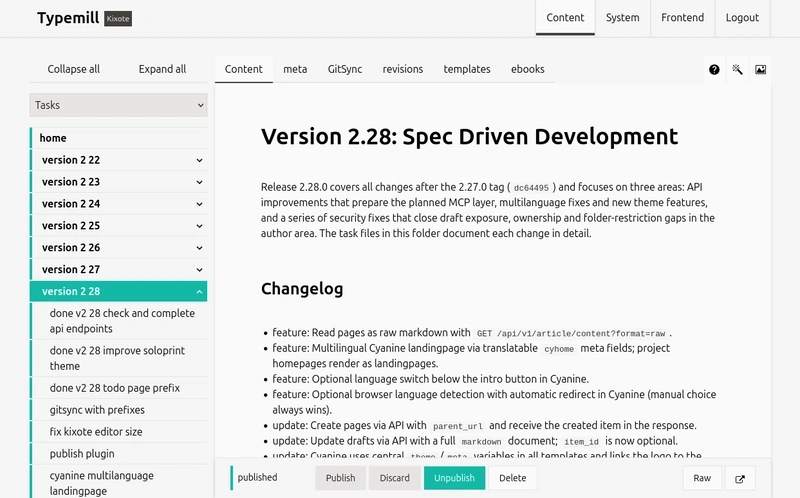
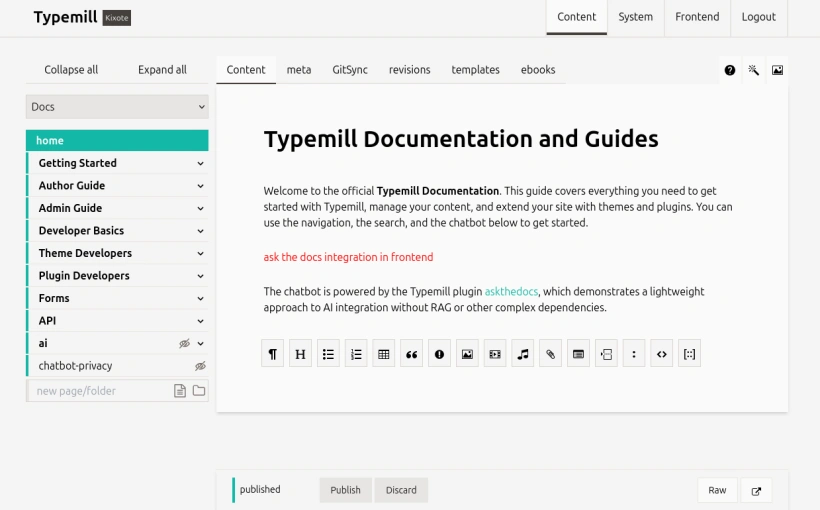
Git and an AI coding agent are sufficient to run this workflow. A browser-based interface adds a way to browse, edit, and organize the files without replacing Git as the underlying version control system. Typemill, for example, can synchronize content with Git repositories; because it supports multiple repositories, you can configure a separate project for private tasks alongside the documentation project and manage both through the same interface even though the content lives in different repositories.
Task files as they appear in the browser:
The documentation project in the same interface:
| Interface | Who works there | What it is for |
|---|---|---|
| IDE | Developers and AI agents | Direct work with the local repositories; supports implementation |
| GitHub | Contributors | Reviewing changes and editing files through the repository interface; repository-level collaboration |
| Browser (Typemill) | Product owners and technical writers | Reading and managing tasks and documentation without command-line work; content interface and publishing platform |
Git remains responsible for version history and synchronization throughout. The design point matters for any AI application decision: the interface does not have to own the data. It offers a convenient way to work with files that remain portable and accessible to other tools.
Common misconceptions about agent-ready tasks
- "The agent will pick up context from Jira or Redmine anyway." Agents operate from the repository; work items kept outside Git are not readable by them, not versioned, and not reviewable as commits.
- "You need a dedicated SDD tool such as Spec Kit before this is worth trying." The task file itself can be the specification, and a folder of Markdown files plus Git and an agent is enough to start.
- "Documentation is a phase that follows development." When docs and tasks sit in the repository, an agent updates the relevant documentation inside the same run that changes the code.
- "If the docs are public, the tasks have to be public too." Separate repositories exist precisely so access rules can differ when tasks hold unfinished security fixes, internal planning, or unannounced features.
- "The browser tool becomes the system of record." The content interface is a view over files; Git stays the version history, and the files stay portable.
- "Every feature of a ticket system is still required." Assignments, comments, kanban boards, and sprints are an open question once agents do most of the work — probably not all of them.
A checklist for evaluating the next tooling
From the layout above, these are the properties worth looking for in any setup that puts tasks in front of agents:
- Git-native: tasks and specifications are readable files managed through Git and connected to the code and documentation.
- Docs and tasks together: one interface provides access to both documentation and task management.
- File-based: Markdown remains readable, portable, and independent of a particular platform.
- Self-hosted: teams retain control over their data, privacy, and infrastructure.
- Open to AI services: developers can choose their preferred AI provider, and the interface should offer generic integrations rather than lock users into a single service.
How to start without replacing anything first
- Begin with nothing more than a folder of task files; Typemill and a flat-file CMS are only one quick option for experimenting, and any setup that keeps Markdown files in Git and gives agents access to them will work.
- Give documentation and tasks the access rules they need, and move the task folder into its own repository as soon as it contains unreleased or sensitive work.
- Keep the approval step before implementation, and reference the task filename in commit messages so requirements and code stay linked.
- Add a browser interface only when product owners or technical writers need to join the workflow, so nobody is pushed into command-line work.
- Track which planning artifacts the agent starts consuming — changelogs, release notes, documentation gaps — and prune the ticket fields nobody reads.
Once tasks follow documentation into the repository, new software and interfaces designed for this model will appear, developers, product owners, technical writers and agents will need a shared place to work, and the interesting part of the work shifts from storing tickets to writing files an agent can act on. The AIApplications desk at AIdataNewsGlobal will keep tracking that tooling as it lands; write to editorial@aidatanews.com if you want to share how your team is doing it. This application guide was written by David Nakamura for AI & Data News.