Embedded Workflow Guide: How CCStudio Agentic AI Changes TI Code Migration
The practical answer for teams maintaining firmware is short: Texas Instruments has pushed embedded assistance beyond a prompt box into a tool-aware loop, so an agent can inspect device context, generate code, build, flash, and debug inside the editor used by engineering teams. TI says that, in CCStudio, the work of moving software from one target to another can fall from months to days.
That claim only becomes useful after a concrete failure test. Ask a general assistant to move a UART and timer routine from one microcontroller family to another while omitting the pin map, SDK version, and clock tree. The first answer often looks tidy, then invents peripheral names, drops init calls, and stalls at the first build. The point of the newer workflow is to keep that failure class in front of the machine.
What changes when an embedded agent receives hardware context
Design engineers have used generative tools for two years to write boilerplate faster, but the hard part of embedded work is not syntax. It is the long tail of constraints: which register controls a clock, which GPIO maps to a board function, which SDK call has changed, and whether the compiled image may be written safely to the target.
Amichai Ron, senior VP for embedded processing and DLP products at TI, characterizes the old state of this work as manual and time-consuming. His framing of the new state is not a better chat model; it is an agent that starts from embedded expertise. That matters because generic code assistants usually have no reliable view of a vendor SDK, a custom board file, or a peripheral initialization sequence.
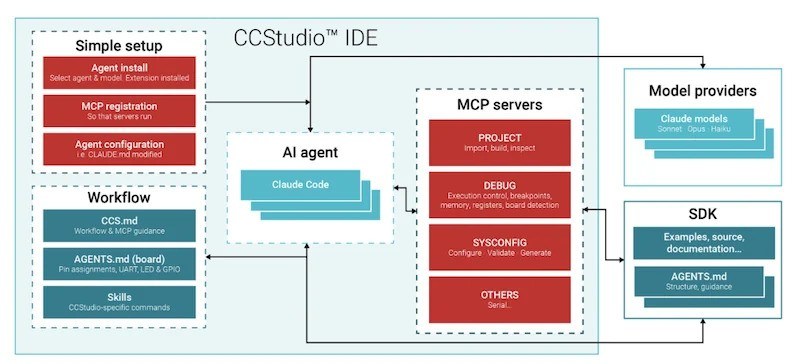
The context layer is the difference between “suggest code” and “carry the migration job”. Source: Texas Instruments
How the mechanism works: SDK files, pin maps, and MCP servers
The workflow feeds the agent with project-bound facts: SDK files, pin maps, peripheral data, and API notes. Model Context Protocol (MCP) servers are the pipe that carries those facts into the tool path. In the public MCP specification, MCP is described as an open protocol for connecting AI applications to external data sources and tools; CCStudio applies the pattern to embedded development resources.
A practitioner detail from that standard is the 2026-07-28 revision, which documents a stateless protocol core and multi round-trip requests. Those capabilities fit long build-debug sessions: the agent does not need to retain an entire migration history in one conversation window if it can call tools in short, resumable rounds.
| Context item | What it prevents | Where the developer still reviews |
|---|---|---|
| SDK files | Invented API calls | Version compatibility |
| Pin map | Wrong GPIO use | Board safety |
| Peripheral data | Invalid register writes | Clocks and interrupts |
| MCP tools | Guess-only build flow | Flash permission |
A reproducible step list for a bounded migration task
- Freeze the baseline. Put the source project, toolchain versions, board file, clock configuration, and failing logs under version control. If the team cannot replay the original build, stop; autonomous porting cannot be verified against an unknown starting point.
- Expose only the needed context. Connect the relevant SDK folder, pin map, peripheral datasheet section, and API notes. A large unrelated document dump makes the agent slower and harder to audit.
- Start in CCStudio IDE or CCStudio for VS Code. Keeping one debugger, one build system, and one project view reduces context rebuilds. The developer should be able to state the task in simple terms without switching consoles.
- Make the agent plan before editing. A reliable first pass lists source files that will change, peripheral dependencies, and API substitutions. If the agent cannot state those, its edit is a guess.
- Review the subagent sequence. Complex migration work should split into analysis, peripheral setup, code updates, then repeated build-error closure until the project compiles.
- Gate the write-to-hardware step. The agent can perform build, flash, and debug actions, but a human should approve the first write to any shared board, prototype, or product in the field.
Output checklist: what a good agent run should leave behind
- A file-level diff with a reason for every touched file, not a rewritten block with no audit trail.
- A peripheral map showing which clocks, GPIOs, interrupts, and DMA channels changed.
- An API mapping table from old call to new call, including removed or renamed functions.
- Build logs that preserve warnings, because warnings often mark the boundary between code that compiles and code that survives a board test.
- A flash log and debugger session note, including the exact target board, firmware version, and rollback point.
- A minimal bench test: toggle a pin, read a sensor, move a packet, or verify a timing window with a logic analyzer.
Which embedded tasks benefit first
Not every firmware change should be agent-driven. The best first candidates are repetitive, bounded, and easy to verify: porting an application from an older SDK to a newer one, replacing peripheral initialization blocks, moving code from a development board to another microcontroller, or updating API calls after a middleware version changes. These tasks have clear inputs and a buildable output, so they expose both the value and the errors of the workflow.
The weakest first candidates are safety-critical state machines, tight interrupt service routines, motor-control timing loops, radio calibration paths, and anything whose failure can damage hardware or hide a rare field fault. In those cases, the agent can still summarize dependencies or draft test ideas, but the final logic should remain under explicit human control and formal review.
Where support exists and what TI showed publicly
TI says CCStudio's agentic AI capabilities are available today across general-purpose and real-time MCUs, wireless connectivity devices, and radar system-on-chips (SoCs). The architecture is modular: task-specific skills, MCP server integrations, and context injection can be extended as devices and SDKs change, which is the practical requirement for teams whose hardware portfolio moves faster than their tooling.
TI's educational resources add one concrete pattern: using an AI agent inside CCStudio IDE to assist migration to a new microcontroller such as MSPM0. At electronica 2026, TI is showing workflows in Hall C4, from system configuration through debugging in CCStudio IDE and CCStudio for VS Code.
Common failure modes and guardrails
- Context drift. The agent reads an SDK document that does not match the installed version. Guardrail: bind each task to a tagged SDK folder and record the version in the migration note.
- False success. A green build is not proof of working firmware. The vendor position is that injected context improves accuracy and reduces hallucinations; treat that as a guardrail, not as test coverage.
- Over-trusted flashing. Autonomous build-flash-debug is useful, but it can erase a board that another engineer is using. Guardrail: require explicit approval for hardware writes and label shared targets in the project settings.
- Undocumented code rewrite. The agent may produce a working port without explaining why a register changed. Guardrail: require a diff rationale and a traceable checklist for every edited module.
- Certification debt. If the team owns IEC 61508, ISO 26262, medical, or aerospace code, the audit trail matters as much as the compiled binary. Guardrail: keep prompts, context sources, and human approvals with the change record.
- License and source hygiene. Public model training data is not a substitute for device policy. Guardrail: only inject SDK and vendor material under the license terms that permit tool use in your development environment.
FAQ: questions product owners and firmware leads ask first
Does CCStudio Agentic AI replace embedded engineers?
No. It removes the repetitive migration pass: locate old APIs, reconfigure peripherals, repeat build-error fixing, and move the project back into a debuggable state. Engineers still own system partitioning, safety margins, timing budgets, and the decision about when a port is actually finished. TI's months-to-days claim is about migration workload, not about eliminating embedded judgment.
How is this different from autocomplete?
Autocomplete predicts the next tokens. The CCStudio path described here is workflow-aware: it uses device context, exposes IDE capabilities to standard agents, and lets the agent act through project structure, build actions, flashing, and debugging. The key difference is not just writing code, but carrying a bounded development task from context to board.
How much migration time should teams expect to save?
Start with the claim from Texas Instruments: software migration can drop from months to days when the agent has the right device knowledge. In practice, measure a narrow pilot first: one peripheral, one board, one SDK version. If the team can complete that pilot with a traceable diff, passing build, and bench result in days, the next task can be larger. If it cannot, the bottleneck is usually missing context, weak test signals, or unsafe hardware permissions.
Can developers stay in VS Code?
Yes. The workflow includes CCStudio for VS Code, so teams that already use VS Code can access the same agentic path without forcing a second toolchain window. The benefit is reduced context rebuild: project view, build actions, debugger, and device context stay near the place where the developer reads code.
When should a team disable autonomous actions?
Disable autonomous flashing when the target is in the field, shared by multiple engineers, connected to high-power actuators, or part of a certification build. Keep autonomous assistance enabled for analysis, code planning, API mapping, and local build iteration, then move to a manual approval gate before hardware writes.
Reproduction notes and the failure boundary
Use a small, auditable experiment before making the workflow standard: one known source project, one target board, one pinned SDK version, one rollback path, and one acceptance test that can be run on the bench. The run is acceptable when the agent can explain why it changed a register, produce a compilable diff, pass the peripheral test, and leave a flash log that another engineer can replay. It should stop when the context is outdated, the build succeeds but the board behaves differently, or the task requires irreversible hardware access. That boundary is the practical version of the claim: Texas Instruments is making migration faster by giving the agent the facts it was missing, while the engineering team keeps control of the parts of embedded development that still carry risk.