
AIApplications Review: Trimble Connect Scheduling vs. the P6 Backbone — Where Agentic Schedule Updates Earn Their Keep
Direct answer: putting an agentic layer over a construction schedule only pays where the master schedule is already fed by live project data. Trimble Connect Scheduling binds the master schedule to look-aheads, RFIs, weather forecasts, daily reports and submittals, then has agentic AI propose adjustments for human review before they are applied. With that feed in place, the tool shortens the distance between "something changed on site" and "the plan admits it." Without it, the agent has nothing to read and no safe right to write.
The decision that determines the outcome is not which model sits behind the UI. It is the read/write topology: who owns the baseline, which systems merely publish signals into it, and who is allowed to move a bar on the Gantt chart on a Tuesday afternoon. Engine quality, domain training and weather hooks are all downstream of that.
What is Trimble Connect Scheduling, in architecture terms?
An AI-assisted capability for viewing and updating construction schedules in real time, positioned inside the Trimble Connect platform to help teams plan work, spot scheduling risk and react to change while the job is moving — not at the next weekly review. It was introduced at the Trimble Dimensions User Conference; the 2026 edition ran November 9-11 at The Venetian Resort in Las Vegas, according to Trimble's own event page.
Two layers carry the design. The first is data binding: the master schedule is linked to live project data such as look-aheads, RFIs, weather forecasts, daily reports and submittals, and the agentic planning engine also reads schedule-related information from Trimble Connect common data environment and Trimble Connect Project Management data in real time. The second is judgement: the engine compares current information with historical operational data and patterns, assesses risk and suggests possible responses, autonomously reviewing multiple data sources so a centralized schedule can be optimized while the project runs.
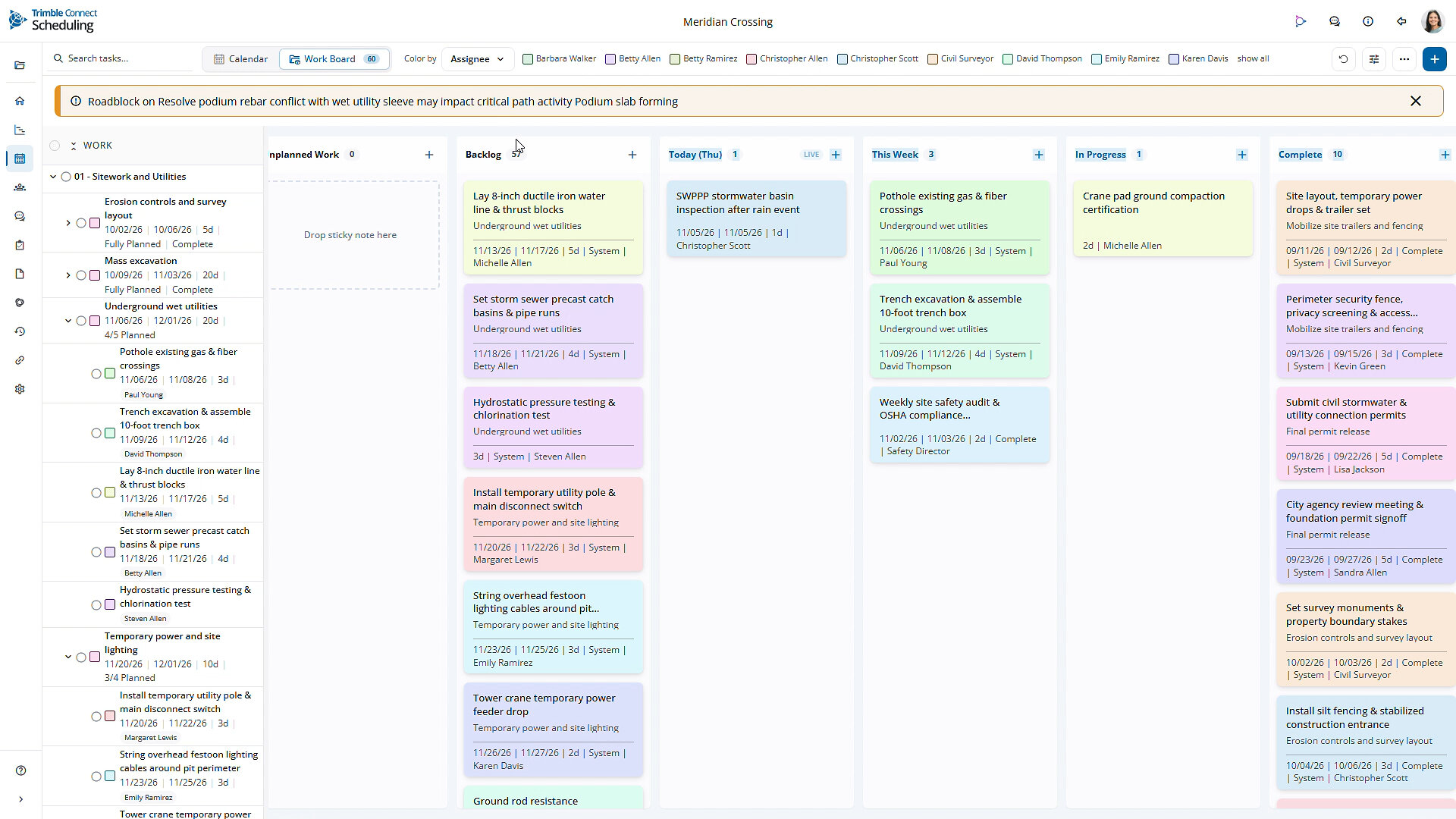
The commit boundary is the part buyers skim past. A suggested adjustment is routed for review before it is applied, and proposals come from a domain-specific model trained on Trimble construction project data rather than a generic assistant. Field leaders, project managers, schedulers, estimators and executives do the reviewing in one shared environment.
Why do construction schedules drift in the first place?
Because inputs move faster than the review cycle. Crew availability, late deliveries, change orders, equipment issues, weather and other disruptions frequently alter construction schedules, while many office and field teams still bridge the gap with spreadsheets, whiteboards, email and text messages. Those fragmented workflows create version mismatches and make early risk identification harder. The real cost is not the delay itself but the delay nobody can see until it lands on the critical path.
The wider evidence is blunt. Research aggregated by Bent Flyvbjerg on large projects finds that about 91.5% end up over budget, over schedule or both, as reported in his Strategy+Business interview. That is a tolerance-and-feedback problem as much as a software problem, and it explains why this generation of tools competes on "react to change" rather than "produce a better first plan."
How does it compare with the other ways teams absorb change?
| Approach | What reads what | Update cadence | Who moves the baseline | Typical failure mode |
|---|---|---|---|---|
| Spreadsheets, whiteboards, email and text messages | Humans re-key status into parallel artifacts | Ad hoc, whoever asks first | Whoever edited last | Version mismatch; risk surfaced late |
| Planning-office CPM in Primavera P6 or MS Project | Planner-owned network logic; field data filtered through the scheduler | Weekly or monthly cycle | Scheduler | Change outruns the cycle; field and master diverge |
| Probabilistic risk add-ons, such as nPlan-style AI-led schedule risk analysis run over an exported CPM schedule | Models trained on how past projects performed forecast activity uncertainty | Scenario runs, not continuous | Planner, after reading the S-curve | Analysis sits off the execution path; suggestions never written back |
| Trimble Connect Scheduling | Master schedule plus live look-aheads, RFIs, weather data, daily reports, submittals and BCF topics | Continuous monitoring | Human reviewer, after the agent proposes | Trust and accountability concentrate on the review step |
The import path keeps the comparison honest: contractors can build and revise schedules in Trimble Connect Scheduling or import schedules from Primavera P6, MS Project and other tools while preserving logic and baselines. Adjacent categories push the same thesis from another direction — SAP sells planning-to-execution continuity in field service, where scheduling is triggered automatically or on request and assignments are AI-optimized. The difference is the object being scheduled: work orders in service, network logic in construction.
What trade-offs do you inherit with an agentic layer?
- The review gate becomes your compliance artifact. Risk is calculated continuously from data across the Trimble Connect platform, so proposal volume rises with data volume. If nobody logs who approved or rejected a resequencing, you have traded a slow decision for an undocumented one — which is why autonomy is better judged by what human operators override and why than by coverage.
- Float is the currency being spent. Delay prevention flags conflicts such as pending RFIs or weather impacts and suggests float use or activity resequencing. Tuesday's float may be Friday's only buffer, so write down which percentage of total float the agent may propose against, and for which milestone tiers.
- Domain specificity trades against portability. A model trained on Trimble construction project data handles construction semantics well; do not assume it reproduces the patterns in your own closed jobs.
- Two masters, one truth. Import that preserves logic and baselines is a feature. Running an imported schedule and a live schedule as co-equal systems of record is a governance bug.
- Alignment depends on look-ahead hygiene. Field look-ahead tasks are linked with the master Gantt chart so jobsite work and project-level tracking stay aligned — and that link is only as accurate as the superintendent updating it. Stale look-aheads produce confidently wrong suggestions.
- Shared collaboration is a workflow tax. One environment for field leaders, project managers, schedulers, estimators and executives removes handoffs but gives every update multiple authors. Ownership and escalation rules must be configured, not inherited.
Which teams should adopt now, and which should wait?
General contractors and subcontractors across construction sectors in North America can access Trimble Connect Scheduling today. Availability is not the constraint; data surfaces are. Adopt now if the master schedule and the daily evidence already live in the same platform, so RFIs, submittals, daily reports and weather arrive as structured records rather than email attachments, and if your weekly update cycle is longer than your typical disruption interval.
Wait if the master Gantt chart lives in a planner's desktop file, refreshes monthly, and field status still travels by text message. In that topology the agent reads a stale artifact, and the wrong suggestion arrives faster than the right one used to.
How to pilot it without breaking the baseline
- Audit the data surfaces: open RFI count, submittal backlog age, daily report completion rate, look-ahead turnover. Anything thin is a remediation task, not an AI problem.
- Import an existing schedule from Primavera P6 or MS Project and confirm logic and baselines survived before the agent touches anything.
- Name the write-master. Everything else publishes signals into it.
- Set the review gate: approver per milestone tier, response deadline, written log of accepted and rejected proposals.
- Run one project read-only for two cycles and score agent flags against the scheduler's own list — the staged-autonomy route taken when Mondelēz International and Accenture applied agentic AI to redesign an end-to-end Order-to-Cash journey rather than bolt an assistant onto the ERP.
- Enable suggestions only after flag agreement is acceptable, then track override rate, time-to-detection and float consumption monthly.
Common misconceptions about AI-driven schedule updates
- "It will replan for me." No: the agentic AI monitors changing conditions, assesses risk and suggests adjustments for review before they are applied.
- "The tool fixes fragmented workflows." It removes the manual relay between office and field only if the sources were already structured. A scheduling layer cannot repair a data layer.
- "More flags means less risk." A flag you cannot act on inside the current cycle is noise, and noise trains crews to ignore the system.
- "Weather integration predicts weather." It consumes forecasts; what changes is how fast the plan reacts to a closing window.
What the contractor validation window does — and does not — prove
Contractor input shaped the development of Trimble Connect Scheduling: Over the past several months, contractors used the system to support schedule organization and communication. That is a claim about workflow fit, not a published overrun-reduction figure, and no schedule-slip metric accompanied the launch. The rest of this section is my analysis, not a vendor claim.
Trimble does publish task-level numbers elsewhere: at its fleet event the company reported AI invoice scanning saving more than 136,000 minutes across 19,500 invoices in TMT Fleet Maintenance, and it introduced Arc Agent, a conversational digital coworker, in August 2026. Read those as evidence of how Trimble measures automation ROI, not as proof for construction scheduling — and ask for the equivalent measure before you commit.
FAQ: questions to settle before wiring AI into the master schedule
Does it replace Primavera P6?
No. It imports schedules from Primavera P6, MS Project and other tools while preserving logic and baselines, so the realistic pattern is P6 as the planning artifact and the agentic layer as the monitoring loop.
What does the AI actually look at?
Live project data bound to the master schedule — look-aheads, RFIs, weather forecasts, daily reports, submittals — plus BCF topics and historical operational patterns.
Can it change my schedule without permission?
No. Adjustments are suggested for review first. The governance question is who reviews, how fast, and what is recorded.
Is it available outside North America?
The disclosed availability covers general contractors and subcontractors across construction sectors in North America. Other regions are not addressed by the launch statement; check trimble.com for current scope.
Decision checklist before you turn agentic scheduling on
- Master schedule is a live record, not a weekly export.
- RFIs, submittals, daily reports and look-aheads exist as structured data in one environment.
- Write-master named; import tested against logic and baselines.
- Float policy written: what the agent may propose against, what stays untouchable.
- Named reviewer, response SLA and override log configured.
- Read-only pilot done for two cycles with a flag-agreement baseline.
- Metrics agreed up front: time-to-detection, override rate, float consumption, milestone slip trend.
Reference sources
- Trimble Dimensions 2026 conference dates and venue — trimble.com/en/our-company/events/dimensions/overview
- Bent Flyvbjerg on large-project overruns — strategy-business.com/article/Why-do-large-projects-go-over-budget
- nPlan on AI-led schedule risk analysis versus traditional risk software — nplan.io/blog-posts/traditional-risk-software-vs-nplan
- SAP Field Service and Asset Management planning-to-execution features — sap.com/uk/products/scm/field-service-management/features.html
- Trimble Insight 2026 agentic disclosures, including invoice-scanning minutes saved and Arc Agent — unite.ai/zh-cn/trimble-unveils-autonomous-ai-agent-ready-fleet-tools-at-insight-2026/