
Local-First Open Source LLM for Mac and Windows: Offline Emergency Reference Checks
For teams assessing open-source assistants, Survival LLM is worth reviewing as a local-first emergency knowledge base: the Mac download is 212 MB, the Windows download is 25 MB, and the source code is free and open source. It answers blackout, burn, and water-purification questions from bundled references after a one-time setup, and it shows the source material with the relevant passage highlighted. The engineering signal is not chat quality alone; it is whether model selection, disk footprint, offline operation, and source visibility can be verified on a real machine.
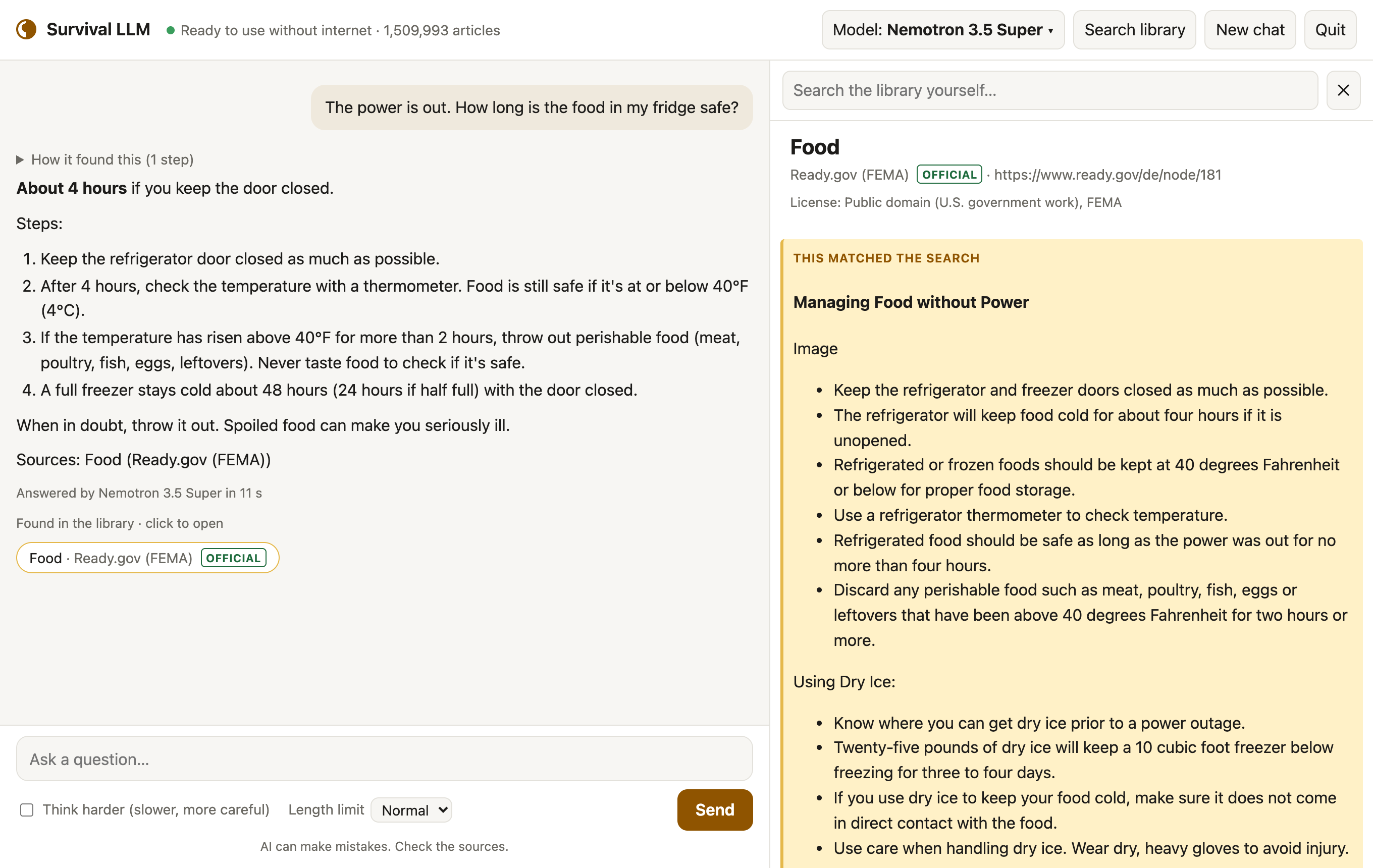
What to inspect before selecting a local model
Offline execution and data boundary
The model and library are stored on the user's computer, so queries do not need an internet connection after setup and nothing asked by the user leaves it.
Visible sources, not just answers
Each reply can show the articles it read; opening one lets the user read the article and see the exact highlighted passage.
Emergency content instead of general web text
The bundled collection is aimed at emergencies and practical repair: medical references, FEMA and CDC guidance, survival manuals, how-to guides, repair guides, and about 930,000 Wikipedia articles.
Model selection and test snapshot
The same application checks available memory on launch and downloads the model that fits; more memory can mean a smarter model. In the table below, 'Right' means the model got the main point of official guidance right on 22 blackout and first-aid questions. Results were graded blind in an emergency test on an earlier build of the library.
| Computer profile | Selected model | Emergency test | Model download |
|---|---|---|---|
| Mac with 128 GB or more memory | NVIDIA Nemotron 3.5 Super | 21 of 22 right | 80 GB |
| Mac with 32–96 GB | Qwen3.8 27B | 21 of 22 right | 18 GB |
| Windows PC with 32 GB or more | NVIDIA Nemotron 3.5 Lightning | 19 of 22 right | 25 GB |
| Mac or PC with 16–31 GB | IBM Granite 4.2 8B | 14 of 22 right | 6 GB |
Because smaller models make more mistakes, the interface always shows the source for manual checking.
Disk, RAM, and OS checks
The library download is 9 GB for all bundled sources, or 19 GB once installed. Without Wikipedia and iFixit, it is 1.3 GB downloaded and 3 GB installed. Free disk space should cover the model's size plus 5 GB, plus about 27 GB while the full library installs, or 10 GB for the smaller library. Compatibility is limited to Apple Silicon Macs (M1 or newer) running macOS 14 Sonoma or newer, and 64-bit Windows 10 or 11.
Setup timeline in three steps
Setup depends on hardware and internet speed, from 20 minutes to about 2½ hours. Most clicks take about 5 minutes; the rest is download time.
- Download Survival LLM for Mac or Windows and unzip it; on Windows, use Extract All.
- Launch the app: double-click Survival LLM on a Mac, or open the extracted folder and double-click Survival LLM.bat on Windows.
- Complete the setup while online: the app opens in its own window and downloads the AI engine, which is built into the Mac app, plus the model selected for that computer and the library.
First-run OS warnings
On first open, the operating system warns that the app is not distributed through an app store. On Mac, click Done, open System Settings > Privacy & Security, scroll to the Survival LLM was blocked notice, click Open Anyway, and confirm with your password; this happens once. On Windows, click More info, then Run anyway.
Source library inventory and license caveats
The library holds plain-text copies of openly licensed references, including some that are for non-commercial use only, and public-domain materials. Search is local and fast.
- about 930,000 of Wikipedia's most-read articles
- WikiMed medical encyclopedia
- MedlinePlus, from the U.S. National Library of Medicine
- UK Medicines A to Z, as public sector information
- WikEM emergency medicine
- Ready.gov emergency guides from FEMA
- CDC travelers' health
- U.S. military medicine and survival manuals
- life tables and U.S. death rates used for micromort risk references
- wikiHow how-to guides
- iFixit repair guides
- Appropedia material on appropriate technology
- Stack Exchange Q&A covering home repair, cooking, gardening, the outdoors, and ham radio
Each article displays the license of its own source. That display is central to any open-source due-diligence workflow, because code, model, and reference text can carry different permissions.
Operational notes that affect adoption
Accuracy risk boundary
AI models can make mistakes, and smaller models make them more often. The visible source list is the practical control: the user can check the original article before acting.
Privacy posture
There is no account and no tracking. Questions remain on the local computer, and after setup the application can run with the internet off.
Custom documents
Users may add PDFs, Word documents, ebooks, and notes, such as a generator manual or a family emergency plan; the assistant searches those files too, and they stay on the computer.
Update behavior
At the bottom of the app, Check for updates installs a new version in one click while keeping models, the library, and user files.
Power draw
On a MacBook Pro, measurement during answering was about 100 W, with each question taking 5 to 40 seconds; a full battery supports roughly 100 to 300 answers. It can run from a small generator or power station.
Open-source adoption checklist
- Confirm the machine meets Apple Silicon Macs (M1 or newer) with macOS 14 Sonoma or newer, or 64-bit Windows 10 or 11.
- Estimate disk headroom before choosing a model: model size plus 5 GB, plus about 27 GB during the full library install, or 10 GB for the smaller install.
- Review each source's displayed license, especially the non-commercial caveat, before any enterprise or commercial deployment.
- Validate answers against the highlighted passage, since smaller models make more mistakes.
- Complete the online download phase first, then operate with the internet off.
- Record the selected model and emergency-test context, such as Mac with 32–96 GB using Qwen3.8 27B and achieving 21 of 22 right, when making deployment decisions.
Common misconceptions
- Open-source code does not mean every article is commercially usable; the library includes openly licensed content, some for non-commercial use only, and public-domain material.
- A local model does not make the answer automatically safe; models make mistakes, and smaller models make them more often, so source visibility matters.
- Setup is not instant; the process takes 20 minutes to about 2½ hours because downloads dominate, while clicks take about 5 minutes.